Aug 2017 release now available (Part I)

The August 2017 (17.8) release of Oracle Service Cloud (OSvC) is now generally available and it brings so many exciting new features and enhancements that, this time, I will break down my thoughts in three posts.

Site Configuration – Mailboxes

Until now, mailboxes were interface-specific items. To configure or manage a mailbox, you would have to be logged in to the interface where it was being used. Not any more!

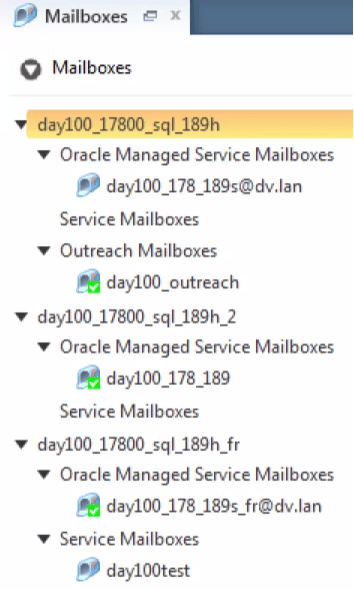
From the Aug 17 release you can manage and configure all mailboxes from a single place (the interface of your choice) making it easier and more efficient for you to manage several mailboxes, in particular when you have multi-language interfaces and you don’t happen to speak them all!

The below screenshot shows the new Mailbox configuration screen, where you have a new tree structure with the list of mailboxes nested under type of mailbox, which in turn is under interface name.
OSvC_Mailboxes_Aug17

Site Configuration – Message Templates

As you know Message Templates are broken down in 3 types: Admin Notifications, Admin Emails and Customer Emails. They allow you to customise the outgoing messages (for Admins, Agents or Customers) for each of your interfaces.

The 17.8 release brings a new feature for the Admin Notifications, that can be extremely useful and increase agent efficiency. You can now add – only to the Incident Assigned message template – a link to the Browser UI (BUI), which will take the agent directly to that particular incident record, in the BUI.

OSvC_MessageTemplate_Aug17.png

Configuration Assistant – Browser UI

Speaking about BUI, you no longer have to ask Oracle to enable it for you, and wait for them to “approve” or “agree” to do it for your company. You can now enable the BUI yourself via the Configuration Assistant (which you can reach in https://ossc-gb.custhelp.com).

Once you login the Configuration Assistant this is what you need to do

  1. Select the site (by clicking the site name/link)
  2. Go to the Integrations area (by clicking the Integrations box)
  3. Scroll down to the Browser User Interface section.
  4. Click the Enable BUI button

Once it is active you will see the message “Browser User Interface is enabled on this service site” as well as the URL, which should be something along the lines of: http:// <yourdomain> .custhelp.com/AgentWeb/

Please remember that the BUI will only be available for your site, if you are in one of the last 5 releases.

OSvC_ConfigurationAssistant_Aug17

Browser UI – Service  Level Agreements

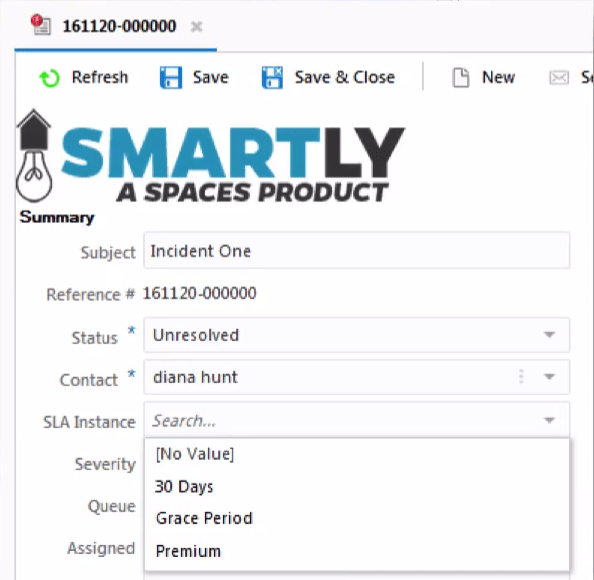
The 17.8 release closes one important gap in previous releases of the BUI. Service Level Agreement (SLA) fields are now supported in the BUI. You can place them on the workspace and agents can view and edit Organisation and Contact SLAs, as well as assign the desired SLA to an incident.
OSvC_SLA_Aug17

Keep your eye on the next post – Aug 2017 release now available (Part II) – in which I will tell you a bit more about some of the most exciting enhancements in this Aug 2017 release.

OSvC Upgrades in 5 Steps

I have been noticing that the Oracle Service Cloud (OSvC) upgrade process is still a bit of an unknown (to used a light term… as some call it “nightmare“) for some people, and hopefully this post will help put things in perspective and demystify it.

Since May 2014 release, Oracle decided to auto-enrol all new OSvC clients to the Auto Upgrade Programme (AUP). Nonetheless there are still many of you out there on the old model, only upgrading when you feel like, and request.

Even though it is not mandatory for you  to upgrade each time Oracle releases a new version of OSvC – i.e. every quarter (February, May, August, November) – it is recommended that you stay as current as possible.

This will ensure that your OSvC environment is as safe and stable as possible; any issues discovered in production sites are fixed; and that you face no delays when you are ready and willing to roll-out, and adopt, new features.

It is also important to know that once an environment is 1 year behind the latest release (i.e. 4 releases without upgrading) it will no longer receive Service Packs. And after 2 years without upgrading (i.e. missing last 8 releases) you will lose Oracle’s support.

So, with or without AUP, when you request or accept an upgrade, here are the 5 main steps of the upgrade, which you should look out for and/or carry out.

  • Step 1 – When a new release is out, Oracle will send you an email notification…
    • Announcing of General Availability of the new release
    • Confirming the date on which your site will be cloned into an Upgrade Site
    • Advising that the upgrade cutover will occur 14 days after the Upgrade Site creation

Note: If you have any ongoing projects, changes or developments that may interfere with the upgrade, then you should contact Oracle to reschedule or skip the upgrade, and you can do that by raising a Service Request in the support site.

  • Step 2 – On the agreed date, Oracle will create the Upgrade Site and send you an email notification…
    • Sharing the Upgrade Site URLs (usually domain–upgrade.custhelp.com)
    • Confirming the Cutover date (which should be set two weeks in the future)

Note: If you do not have availability to perform the necessary User Acceptance Testing (UAT) within the next two weeks, you should reschedule the upgrade Cutover using the Hosting Management System.

  • Step 3 – You should perform any necessary regression and user acceptance testing in order to assure that the upgrade did not impact any standard or custom functionality.
    • Prepare the upgrade site for testing by re-configuring mailboxes (point to test mailboxes), integrations (point to test web service end points)
    • Test core functionality
    • Test channel interactions (email, chat, social)
    • Test customisations (add-ins, custom scripts, etc.)
    • Test customer portal
    • Test automation (business rules, workspace rules, etc.)
    • Test integrations (real-time, batch, etc.)
    • Test new functionality made available in latest release

Note: If you have any questions or find any problems in the Upgrade Site you should report them to Oracle following the normal support route, raising a Service Request in the support site.

  • Step 4 – Oracle will perform Cutover and upgrade your production site to the new version.
    • During the cutover your site is inaccessible for both Agents (Console) and Customers (Portal). Customers will see a general message indicating that the site is undergoing maintenance. And it is possible to have a custom splash page display (see Answer ID 1306)
    • Customer won’t be able to access answers or submit incidents via the Customer Portal. However, emails can be sent to a Service mailbox, and will be queued in the mailbox(es) and incidents created when the Techmail utility runs for the upgraded site. Therefore, no incidents submitted via email are lost during the upgrade process
    • When your production site is upgraded the database from the existing production site is merged with the configuration files of the upgrade site. Please check Answer ID 1925 to see which changes are carried from the production and the upgrade site.

Note: You can request an adjustment of the cutover date and time. Oracle will send email notifications to confirm cutover start and completion.

  • Step 5 – You should perform any necessary final checks, tests, etc.

Note: If you have any questions or find any problems you should report them to Oracle following the normal support route, raising a Service Request in the support site.

Depending on how much time you need to do the regression and user acceptance testing, the upgrade process may take between 6 and 8 or 10 weeks. And there is a crucial period you must not forget: the code freeze – from the moment Oracle creates the Upgrade Site (Step 2) until the upgrade itself is complete (Step 4).

Corporatism vs Consumerism

Geocentrism vs Heliocentrism

Nineteen centuries ago, in the II century, a famous astronomer and mathematician called Claudius Ptolemaeus published and established a model which described the Universe with planet Earth at the centre. It was called the “Geocentric Model” (aka Geocentrism), and said that the Sun, Moon, and all other planets, including all other stars, orbited around Earth.

aristotelian_cosmo

This model was accepted by everyone until, 14 centuries later, in the XVI century (1543) an astronomer and mathematician priest, called Nicolaus Copernicus, proposed a new model, called “Heliocentric model” (aka Heliocentrism), where the Sun was at the centre, with the Earth and all other planets orbiting around the Sun.

Copernican_heliocentrism_diagram-2.jpg

This model, as we very well know today, was then proven correct. But it took some time for people to believe it. Actually, when Copernicus published it, very few believed him. And the ones who did even faced charges of heresy. One of those was scientist Giordano Bruno, burned to death for teaching Heliocentrism.

The church banned Heliocentrism, because it contradicted the Catholic idea that humans were at the centre of the Universe. It took almost one century (1632) for people to start accepting it, when brilliant minds like Galileo Galilei (astronomer, physicist, engineer, mathematician) started pushing and giving credit to Copernicus.

And it was only 300 hundred years later, in the XIX century (1822), that the Pope officially removed the ban on Heliocentrism, even though the majority of the scientific community and the people had already started believing it 100 years earlier.

Corporatism vs Consumerism

All this to say that, in our days, we have a similar situation. Until not long ago, everyone believed in a model where Brands, Organisations, Companies were at the centre, and all Customers, Members, Citizens would orbit around them. Much like Geocentrism, let’s call this Corporatism.

(Please note that Corporatism is a term already in use with a few definitions. In this case, we define it as the control of the market by organisations).

But the truth is a new model has been found, and it has been already proven – by many in the Customer Experience community – to be the correct model. One where the Customer is at the centre, and all Brands, Organisations, and Companies orbit around the Customer. Much like Heliocentrism, let’s call this Consumerism.

(Please note that Consumerism is a term already in used with a few definitions. In this case, we define it as the control of the market by customers).

Similar to what happened with Copernicus and his Heliocentrism, Consumerism has not been totally accepted by many. And we still see in the market place a significant amount (maybe the majority, really!) of organisations still operating under Corporatism laws and practises.

The good thing is that reality is knocking on their doors, and the world has got to a point – with the advent of technology and social media – where Consumerism is inevitably swallowing those who insist in operate in models that are clearly obsolete. Customers are increasingly empowered and in the driving seat.

To avoid collapse, all those brands, organisations, and companies which still operate under Corporatism, will need to surrender to the Consumerism model, start focusing on Customer Experience, and undertake transformation. Become customer-centric, innovate, improve their business processes with an outside-in perspective.

It is not an easy task. But, with the help of the right specialist consultants, it will certainly not take those Brands, Organisations and Companies 300 years to change.

Setting max Live Chat sessions

In the blog post Words that characterise Live Chat, for Consumers and Companies I talk about why Live Chat is so important these days. It is definitely becoming the favourite channel for customers who want to engage with a brand or organisation.

Live Chat is also proving to be one of the preferred channels for those brands and organisations, as it not only seems to increase customer satisfaction, but is also of a much lower cost than any other assisted channel (e.g. phone, email).

One of the main reasons for that is because agents can handle more than one Live Chat session at a time. Best practice says 3 is the ideal maximum number of Live Chat sessions an agent should handle at anyone time, but the truth is it varies.

Senior agents can certainly handle more Live Chat sessions at a time than Junior agents. But Senior agents dealing with complex cases might need to handle less Live Chat session than other agents responding to simple enquiries.

Oracle Service Cloud allows you to set the maximum number of Live Chat sessions on a profile-by-profile basis. But it also allows you to let agents, in the same profile, to change the maximum number of Live Chat sessions for themselves.

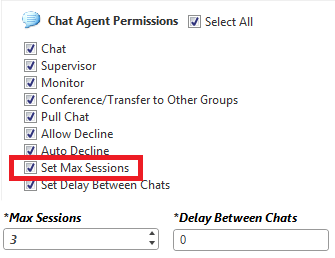
Most of you would have noticed the “Max Sessions” attribute in the “Chat Agent Permissionsarea of the Profile, which sets the maximum number of Live Chat sessions that an agent can be engaged in.

OSvC_SetMaxSessions

But it is also important to understand what is the utility of another attribute: the “Set Max Sessions”. This attribute is what will allow agents to change the maximum number of Live Chat sessions for themselves – within the boundaries of “Max Sessions”.

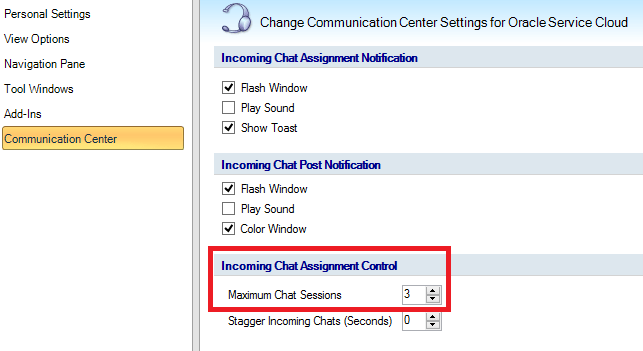
With the “Set Max Sessions” attribute enabled, agents will be able to navigate to their “Communication Center” options (application button in the upper-left corner) and change the “Maximum Chat Sessions” – but not go over what is set in “Max Sessions”.

OSvC_MaxChatSessions1

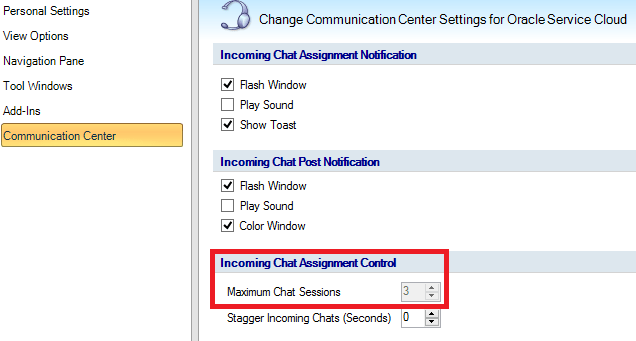
If the “Set Max Sessions” attribute is disabled, then the “Maximum Chat Sessions” in the “Communication Center” options will be greyed out, and agents would have to stick to the maximum number of Live Chat sessions set by the administrator.

OSvC_MaxChatSessions2

M&S and CX consequence of data-driven strategy

For those who don’t know Marks & Spencer (M&S) it is one of the leading retailers, with 1,300+ stores in the UK and overseas. M&S sells clothing, home products and food, online and in store.

M&S has been recognised for great Customer Service and overall Customer Experience, always featuring amongst the leaders of the CX rankings in the UK. And indeed they are also recognised by the quality of their products.

I have been a customer of M&S for some years now, and frequently have lunch at the M&S Food closest to our office. I’ve been a great fan of their stores and advocate of the quality of their products, and customer service.

Back in Jan 2017, UK’s most famous airline, British Airways (BA), announced they were going to stop offering free snacks and drinks in the short haul flights within Europe, and were introducing a “M&S on board” menu.

I’m also a great fan and advocate of BA, and a Bronze level member of their Executive Club. A few weeks ago, was flying to Porto (Portugal) and decided to buy a coke and a packet of my favourite nuts: cashews.

Surprisingly, the cashews were awful. They were stale and really tasted bad. Such that I could actually not finish the small packet. After touch-down in Porto, I decided to let M&S know, via Twitter.

It only took 1 hour for M&S to come back, and do the right thing – as I expected from a company that really goes the extra mile when it comes to Customer Service and Customer Experience.

Marks_And_Spencer_Twitter.png

M&S apologised, publicly, and asked if I could get in touch, and provide my details. I’ve sent my address and email by DM. To which they responded “Thanks Luis, we’ve passed this onto our Food Team and they’ll be in touch with you directly“.

This was a Thursday, and I came back to London on Sunday. To my surprise, a letter from M&S was already waiting for me in the mailbox, with not only a follow up, but also a £5 gift card – notice that the packet of cashews cost £1.60

Marks_And_Spencer_mail.png

What is impressive is not only the M&S speed, transparency and openness but also the evident link that must exist between the different teams (e.g. customer service, food) and channels (e.g. social, mail). I’m sure this is not by chance.

I must associate this with the M&S strategy since a few years. M&S boss, Steve Rowe, said last year that he wanted to turn the retailer into a “data-driven business” and that customer data should be shared “as far and wide as possible” within the business.

Nathan Ansell, Global Director of Loyalty, Customer Insight and Analytics at M&S, also said that it was “hugely important to show [to employees] there is a direct link between a brilliant customer experience and delivery of results”. And that part of his job was “to make sure everyone has the right access to customer data, so people can make the best possible choices“.

I think the experience that I share above is a good example of what the M&S leaders were saying, and a proof that they are actually implementing it. And that indeed, having the right access to customer data, helps everyone make better, and informed, decisions. And ultimately deliver an outstanding customer experience.


Configuration Settings – Tips VI

Oracle Service Cloud has circa 500 configuration settings, which control the platform’s functions. Some of them are commonly used but many are not that well known. Below are a few that you might want to be aware of.

CP_MAINTENANCE_MODE_ENABLED

In case you are undergoing some sort of maintenance and your customer portal (CP) is down, you can enable the CP maintenance mode by setting this configuration setting to “Yes”. If enabled, customers will be redirected to the splash page (*), when they try to access any CP page in production. Additionally, all syndicated widgets will also stop displaying any information. By default, this configuration setting is set to “No”.

(*) splash page can be found at:

http://yoursite.custhelp.com/cgi-bin/yoursite.cfg/php/euf/config/splash.html

osvc_splash_page

USER_WAIT_QUEUE_TIMEOUT

If Live Chat is enabled, we usually allow customers to request a chat session and wait in the queue for an available agent. Even though we configure chat to avoid customers waiting for long, there could be instances where they struggle to go through to an agent. This configuration setting defines the time (in seconds) that a customer remains in the wait queue before receiving a “Please try again later” message. The minimum value for this setting is 120. Maximum value is 999999. Default is 1800 (30 minutes).

TBAR_LINK_LIST

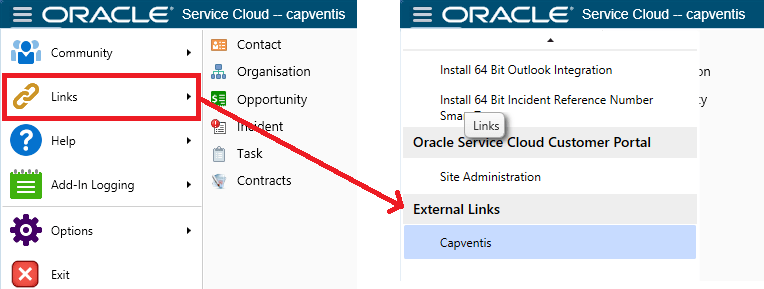
For those who spend a lot of time working from the OSvC console, it could be handy to have short-cuts to other systems, applications or sites. This configuration setting allows you to add a list of preferred or favourite links to the Links option of the menu on the navigation area of the toolbar. Links will appear in the menu in the order that you enter them. By default this list is blank.

The way to add links is to the configuration setting is

item(1, “Link Name”,”http:// www. domain. com”)

See example in the screenshot below: item(1, “Capventis”,”http:// www. capventis. com”)

You can insert separator between links by entering item(0, “”,””)

osvc_links_external

Service Cloud Customer Advocacy Programme

The Oracle Service Cloud Customer Advocacy Programme is one of the most important pieces of the Oracle Service Cloud community, as it helps users of the platform to showcase and celebrate their success.

The programme also allows customers to talk to industry and thought leaders, influencers, and research companies. Customers can even become Champions, be nominated and (who knows!) win, at the prestigious annual Oracle Service Cloud Awards gala.

Listen to Jeff Wartgow (Director of Outbound Product Management) and Stephanie Kaleva (Senior Manager Customer and Employee Advocacy) to know more about the programme and how to get involved.

CX Editor – Edit answers inline in the Customer Portal

In MSE17 I had the pleasure to meet my fellow All Star 2017 Bastiaan van der Kooij, from CX Builders, and get to know the amazing work he has been doing around Oracle Service Cloud.

One of the coolest things he has developed, is the CX Editor, an inline WYSIWYG editor for knowledge base answers, which allows the authoring of answers directly in the customer portal.

It has all the necessary and key functionality that a knowledge manager or administrator would expect (and has available in the console) but also a whole raft of other cool and very useful features and functions.

For example, it enables users to easily insert custom components like accordions or tab sets, with preview capability, and even provides A/B comparison between updated and original versions.

If you want to know more about it, see the demo:

The CX Editor is available to buy and download on the Oracle Cloud Marketplace. Click here to access. Alternatively, contact Bastiaan at info@cxbuilders.com or visit the CX Builders website to see what other cool add-ins are available for Oracle Service Cloud.

Knowledge Base Search – How does it work?

This is a question that several of our customers have asked us, when they start to build their own knowledge base of answers, to enable customer web self-service.

The knowledge base search (knowledge foundation) is not a simple mechanism. That is why it is so powerful, intelligent, dynamic and self-learning.

A picture is worth a thousand words, so I decided to put together a diagram that depicts the process, and below leave you with a few definitions to be better understand the different components.

oracle_service_cloud_kb_search.png

Weight

When a search is performed, each keyword and/or phrase entered by the customer is compared to the contents of the answers.

The Weight is a numerically calculated value, based on the number of occurrences, capitalisation, and location of a word. It is equal to the sum of the weights of all the matched words from the search.

The location of the word is important. It is ordered and weighed as per the diagram – e.g. words that match the Summary field will have higher weights than those that appear in the Answer field.

Computed Score

The Computed Score of an answer is usually the same as its Score, unless its Display Position is set to fix it at top/bottom. In that case, the Computed Score is calculated using the score of the answers located at the top or bottom of the list.

To better understand, if a new answer is created, and set with Display Position = “Fixed at the top”, once it is published, its Score will be zero, but the Computed Score will be larger than the highest score for all the published answers.

Score

The Score is a calculated value that ranks the order of answers, and indicates the usage of the answer, as well as how helpful that answer has been to customers. It is calculated based on the Solved Counts:

  • 75% of the score is based on Solved Count, linked to customer usage
  • 25% of the score is based on Solved Count, linked to agent usage

An answer with a large score indicates that several customers (and/or agents) have viewed that answer and that the answer was somehow useful to them.

Solved Count

The Solved Count collects information about the usefulness of answers in the Knowledge Base. Two types of data is gathered:

  • Implicit data – compiled by how customers select and view answers. If a customer views an answer, the solved count of the 1st answer is increased, but not as much as the 2nd viewed answer. In other words, the answer that the customer views last receives the largest solved count increase.
  • Explicit data – compiled by how customers rate individual answers – from the responses to the question “Is this answer helpful?


Configuration Settings – Tips V

Oracle Service Cloud has circa 500 configuration settings, which control the platform’s functions. Some of them are commonly used but many are not that well known. Below are a few that you might want to be aware of.

EGW_SECURE_UPDATE_ENABLED

One of the questions that has been raised quite a lot in our implementations is what happens if an agent CC’s someone else other than the Contact in an email response, and that person then responds?

This configuration setting, if enabled (set to “Yes”), prevents any other person – apart from the primary Contact associated to the Incident – from responding to the email. If a CC’d contact replies to the email, OSvC will not accept it as a response, and will notify the sender that he/she is not the primary contact, and thus their response will be discarded.

If you disable it (set to “No”), then any person can respond, and an Incident can be updated by any email address or Contact.

By default, this configuration setting is enabled (set to “Yes”). And unless you have a really strong case, I would recommend you leave it as-is.

SEARCH_WITH_OPERATORS

Searching a Knowledge Base of answers can be hard, particularly when it has loads of answers, and it is our job to make it easier for customers to find what they need.

This configuration setting enables the ability to use special characters or operators “+” (plus), “” (minus) and “~” (tilde) while searching for answers.

These operators help refine the search and I’m sure most of you know how to use them. The plus operator links words together, the tilde operator makes the search look for synonyms, the minus operator excludes words from the search.

By default, this configuration setting is enabled (set to “Yes”), and I would recommend you leave it as-is, to ensure your customers can use all means and tools at their disposal to search.

SRCH_WILDCARD_MIN_PREFIX

One of the most common things, when searching content on the web, is also the use of wildcards. And customers are used to it. Now, unlike the above setting, this one helps broaden the search.

This configuration setting controls the minimum length of the term allowed in a wildcard search, on the OSvC knowledge base and portal.

  • The minimum value is zero (0)
  • The maximum value is 100
  • The default value is three (3)

This means that, for example, if the configuration setting is set to three (3)…

  • a search for “Vic*” will be treated as a wildcard search
  • a search for “Vi*“will be discarded (customer will get “No results found“)
  • a search for “V*” will also be discarded

Of course the value to which you should set your own instance is dependant on your requirement and the size of your knowledge base. Large knowledge bases may require this configuration setting to be higher in order to avoid impact on search performance.