How to deploy Live Chat in 3 Steps

Live Chat is a native channel of Oracle Service Cloud (OSvC), and one that is more and more in vogue. Text-enabled, real-time, conversations are the preferred way for many customers when engaging with companies.

One of the most popular ways of deploying OSvC Live Chat is placing the Conditional Chat Link syndicated widget in the company’s website. This is done in 3 simple steps:

Step 1 – Placed this snippet of code above any individual syndicated widget script. For performance reasons the recommended best practice is to place the code just before the closing tag and above any syndicated widget instance tags.

< script type=”text/javascript” src=”//yourdomain.widget.custhelp.com/euf/rightnow/RightNow.Client.js” >< /script >

Step 2 – This snippet of code is specific to the syndicated widget instance. For performance reasons the recommended best practice is to place this snippet of code just before the closing tag.

< script type=”text/javascript” >
   RightNow.Client.Controller.addComponent(
   {
      container_element_id: “myChatLinkContainer”,
      info_element_id: “myChatLinkInfo”,
      link_element_id: “myChatLink”,
      instance_id: “sccl_0”,
      module: “ConditionalChatLink”,
      type: 7
   },
   “//yourdomain.widget.custhelp.com/ci/ws/get”
   );
< /script >

Step 3 – Place this snippet of code on your page(s) wherever you would like the Conditional Chat Link syndicated widget to appear.

< div id=”myChatLinkContainer” >
   < div id=”myChatLink” >
      < div id=”myChatLinkInfo” >
      < /div >
   < /div >
< /div >

Once you place the above code in your company’s website page(s) you should be able to see the Conditional Chat Link syndicated widget display.

But to deliver a good customer experience, you need to manage customer’s expectations, therefore you don’t want to have the Conditional Chat Link syndicated widget available in your website if there isn’t anyone available to respond.

The Conditional Chat Link syndicated widget has various configuration settings, and some of the most used are:

  • min_sessions_avail – Minimum number of open agent sessions that must be available in order for the Conditional Chat Link to be actionable.
  • wait_threshold – Maximum wait time where the customer should still be allowed to launch a chat.

Note: Please notice that min_sessions_avail will always override wait_threshold.

So, for example, if you want to set min_sessions_avail to 2 and wait_threshold to 5 mins (or 300 seconds), you would need to set it on the syndicated widget and OSvC would generate new code adding the following lines to step 2:

min_sessions_avail: 2,
wait_threshold: 300,

In this scenario, where the Conditional Chat Link syndicated widget is unavailable, it is also useful to configure the setting label_unavailable_busy_template which is the label to be displayed when chat is unavailable due to agent session (Minimum Sessions Available) or wait time conditions (Wait Threshold).

By default, label_unavailable_busy_template isAll agents are busy but you might want to configure it to something more appropriate.

If you would like to know more information about the behaviour of the Conditional Chat Link syndicated widget, you can use the Conditional Link Stats report, which is used to display Conditional Chat Link syndicated widget statistics.

This report is out-of-the-box and displays the number of times the widget was loaded, the number of times the widget was active, the number of times the widget was clicked, and the respective percentages of each.
Let’s celebrate “CX Day”

CX_Day_header.png

Tuesday, 3rd October 2017, is CX Day, a global celebration of everyone (companies and professionals) that strive to create and deliver great experiences for their customers. It is organised by the Customer Experience Professionals Association (CXPA), and you can see all about it in cxday.org.

CX Day will be celebrated all around the world, with various online events (see here), and c. 30 local events (I will be in London, see others here), which will have different topics of discussion (in London we will have “What is in the Heart of a Successful CX Strategy“).

But the fun will also be at our companies, with usual company celebrations (see here a few examples and ideas – adhere and share your pictures). As well as at the 2017 Impact Awards (see here the judges, the finalists and past winners). It is also very worth to check the fantastic blog posts at the Blog Carnival.

I look forward to celebrate the CX Day, with me fellow CX-zealots in London, in particular as it will be the first one celebration, as a member of CXPA and qualified CCXP.

CX_Day_WeLoveCustomers_logo.png

Forrester Wave Q2’17: Oracle and SFDC leading

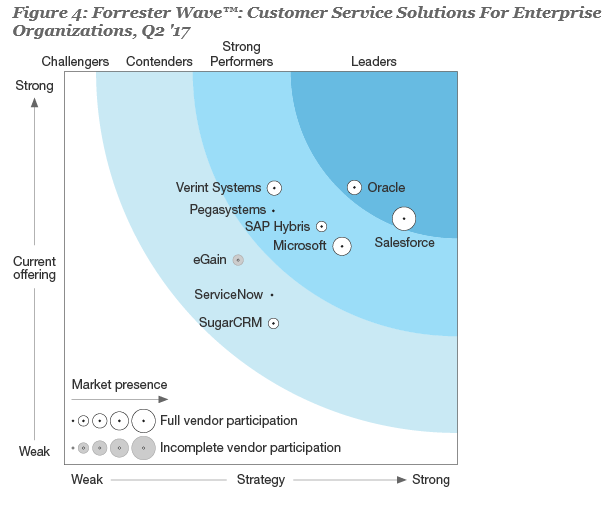
20170926 Forrester Wave - Customer Service Solutions for Enterprise Organisations Q2 17

Forrester has recently published their “Wave” for Customer Service Solutions for Enterprise Organisations, and it is not surprising to see Oracle and Salesforce leading the pack, followed by Verint, Pegasystems, SAP and Microsoft as strong performers. When it comes to the leaders, here are some interesting things that Forrester points out…

Salesforce

The report says that “Salesforce leads with a broad – but not always deep – feature set and vision“. As expected and well known, the product has very strong capabilities. According to Forrester it has “fair incident management capabilities” and allows for “agent utilisation and workload” reporting, even though there is “no native telephony” as well as “full workforce management and quality monitoring” capabilities.

According to Forrester, Salesforce also “offers a breadth – but not depth – of omni-channel capabilities“. It has “basic omni-channel routing” which can only be extended via partnerships. The knowledge management capabilities are “solid and extended via forums provided via Community Cloud“. And reporting capabilities are “augmented by analytics, data discovery, and prescriptive advice scenarios provided via the Analytics Cloud and Einstein Data Discovery“.

Finally, Forrester says that Salesforce offers “industry-specific clouds for financial services, healthcare, and government” and implementations are done by their consulting services and “certified system integrator network“, which Salesforce seems to treat as “an extension of company resources“, developing also a “developer network“.

From a customer perspective, Salesforce’s “references were positive about their ability to execute, yet complaints about the product’s expense continue“. According to Forrester, Salesforce has c. 5,000 customers using this solution.

Oracle

Forrester states that Oracle “excels at knowledge-infused omni-channel service“, as it is aiming to deliver “knowledge-driven service experiences across channels, touch-points, and devices“, following the company’s vision to “enable organisations to deploy any combination of channels dynamically, regardless of what new channel combinations may arise in the future“.

The reports states that Oracle “offers voice natively and via partners” and it also provides reporting capability around “forecast agent workloads and monitor agent performance“. It delivers “knowledge-infused omni-channel interactions across a broad and deep mix of channels” offering “excellent email, chat, visual engagement, feedback, and outbound communications capabilities” as well as “fair social management” that could be extended via Oracle Social Cloud platform.

Unlike its competition, Oracle “is a horizontal product” and it’s most seen in “industries such as retail, consumer packaged goods, high tech, manufacturing, telecommunications, financial services, the public sector, and higher education“. Offering “deep consulting services” and “a growing developer ecosystem“.

From a customer perspective, Oracle’s “customer references are happy with the channel capabilities and solid performance of the product” but there has been some concerns “over account management and customer service practices“. According to Forrester, Oracle has c. 3,000 customers using this solution.

Oracle changing version terminology

As I’m sure most of you know, Oracle releases new versions of Oracle Service Cloud (OSvC) every quarter. And does it always in the months of February, May, August and November. That is why when we talk about versions we either say “May 16” or “16.5“… “Nov 15” or “15.11“.

But Oracle announced recently that it is going to change the naming and terminology of versions. And the reason they are going to do that is for “clarity and consistency“. This change will take effect from October 2017.

Oracle is going to use the last two digits of the calendar year (e.g. “17” for 2017 or “18” for 2018), and then the letters “A”, “B”, “C”, and “D” for the four calendar quarters – as releases will continue being delivered in February, May, August and November.

So, here is how it is going to wor…

  • In November 2017, the OSvC release will be “17D
  • In February 2018, the OSvC release will be “18A
  • In May 2018, the OSvC release will be “18B”
  • In August 2018, the OSvC release will be “18C”
  • In November 2018, the OSvC release will be “18D”
  • and so on and so forth…

When it comes to the “Maintenance Packs”, they will be applied on a monthly basis, and “patches” applied as needed. When it comes to terminology, Oracle will name them “Oracle Service Cloud <version> <month> Maintenance Pack”.

So, here is how it is going to work…

  • In December 2017, the OSvC maintenance pack will be called “Oracle Service Cloud 17D December Maintenance Pack
  • In March 2018, the OSvC maintenance pack will be called “Oracle Service Cloud 18A March Maintenance Pack
  • and so on and so forth…

As a side note, updates to Browser User Interface (BUI), the Auto-Upgrade Program, and the Legacy Upgrade Process will not change.

How to check where Chat is coming from?

This is one of the requirements that many companies using Oracle Service Cloud (OSvC), and indeed other platforms, have.

There are many live chat touch-points across the website, in different pages, and it would be valuable to know where are customers coming from.

Simon Kilgarriff, ex-RightNow and Oracle employee, now working for Capgemini, shares in this video one of the ways to achieve it.

This solution requires that companies license and implement the Engagement Engine (EE), a legacy ATG solution that Oracle integrated into OSvC a while ago.

It is a great tip for those who have similar setups. However, if you don’t have or need EE (sometimes it is a sledge-hammer to crack a nut), there are always alternatives.


How to understand your customer

One of the key disciplines of Customer Experience (CX) is Customer Understanding. In order to design, implement and provide an outstanding CX, companies need to know and understand their customers, and their customers’ needs.

In order to do that, companies need customer insight, that can be collected from various sources, one of them being the customers themselves. For that a Voice-of-the-Customer (VoC) programme needs to be put in place.

VoC helps you understand customer requirements, and determine what they perceive as being most valuable to them. At this point, it is important to also be aware of the Kano Model, and the fact that there are different types of requirements:

  • Must-bes: those that customers expect by default. If met, they have no positive impact. If not met, they have huge negative impact.
  • One-dimensional: those that are stated by the company. If met, they result in additional satisfaction.  If not met, they result in dissatisfaction.
  • Attractive: those that will surprise and delight customers. If met, they will “wow” the customer. If not met, they will have no impact.

(Notice that it is normal to see, over time, a one-dimensional requirement become a must-be. And an attractive become a one-dimensional).

There are various ways to collect VoC.

  • Qualitative methods, like mining unsolicited customer feedback (e.g. phone calls, emails, social media), or conducting ethnographic research.
  • Quantitative methods, like analysing data from CRM and finance systems, or gathering information through surveys.

Qualitative research is extremely important and effective. Due to its nature, it is done on a small number of customers. However, results may be completely skewed if the customer sample is not quite right.

On the other hand, Quantitative research is done on a much larger number of customers. And this will allow companies to feel more confident on a more accurate picture of customers and their needs.

Research on a significantly large sample of customers can only be done when enabled by technology. There are various platforms available. In my opinion Qualtrics is probably the best, and one of the most trusted, platforms in the world.

(I first came across Qualtrics in the Summer of 2016, and the company I work for, Capventis, quickly decided to adopt it as one of the preferred technologies. Since then we built a team of certified Qualtrics experts, and have supported 30+ clients. It can be used for CX initiatives, as well as Employee, Brand or Product Experience).

With a complete understanding of the customer, his requirements, and what he values the most (or perceives as being of value) companies – those working under CX strategies (and with VoC programmes), or those undertaking CX initiatives (in particular at the research stage) – will be able to deliver outstanding experiences, differentiate in the marketplace and ultimately succeed and grow.

CCXP Certified!

ccxp logo.png

Today I became a Certified Customer Experience Professional (CCXP).

For those of you who don’t know, the CCXP is a certification provided by the Customer Experience Professionals Association (CXPA) – worldwide recognised CX authority.

The CCXP exam is definitely not a piece of cake. It assesses your competency in 6 core disciplines:

  • Customer-Centric Culture
  • Voice of the Customer, Customer Insight, and Understanding
  • Organisational Adoption and Accountability
  • Customer Experience Strategy
  • Experience Design, Improvement, and Innovation
  • Metrics, Measurement, and ROI

I’m extremely happy to finally have accomplished this goal – which I’ve set for 2017 and for which I invested considerable amount of time and study.

And I’m proud to become one of less than 500 people in the world, 70 in Europe and 50 in UK, with CCXP certification.

Speaking about study, I would like to share with those interested the way I prepared:

  • Attended a 1-day CX Masterclass with Ian Golding
  • Read the following books
    • Outside In
    • Chief Customer Officer
    • Chief Customer Officer 2.0
    • Effortless Experience
    • Uncommon Service
    • I love you more than my dog
    • The basics of process improvement
    • Lean Six Sigma for Dummies
    • CCXP Exam Preparation (which also provides exam sample questions)
  • Took the sample exams provided by CX University

I hope this will help and encourage some of you.

Aug 17 Release now available (Part III)

The August 2017 (17.8) release of Oracle Service Cloud (OSvC) is now generally available and it brings so many exciting new features and enhancements that, this time, I am braking my thoughts down in various posts. You can read the first one here, and the second one here.

Community Self-Service – CKEditor

The CKEditor is an open source text editor, written in JavaScript, designed to standardise text editors and features in web pages. And is widely used.

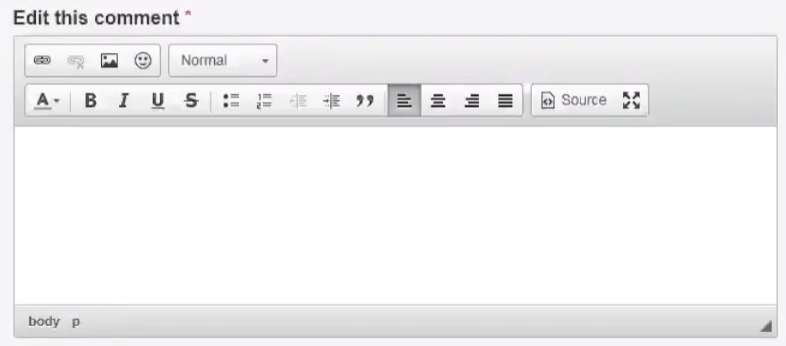
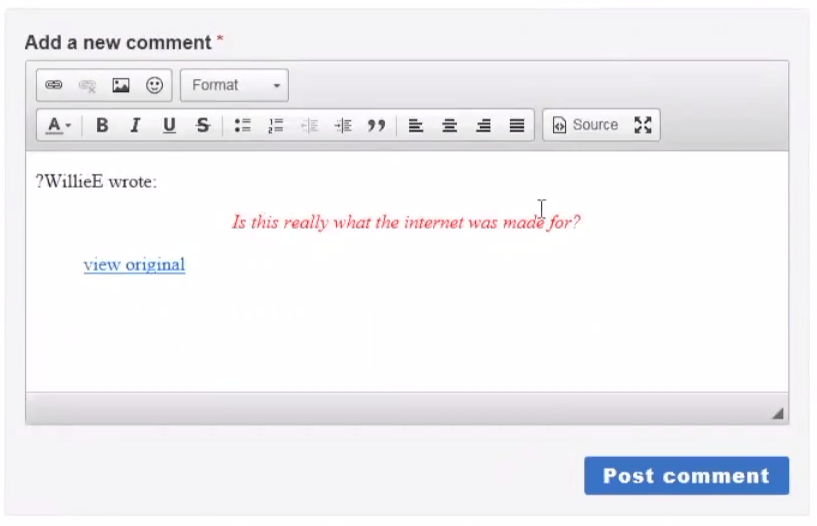
The 17.8 release of OSvC adds CKEditor to the Community Self-Service, giving customers a much better and improved text editor, when submitting questions or comments.

Customers will have a WYSIWYG bar to edit text, ability to paste text from MS Word, and do custom HTML formatting. CKEditor also supports accessibility with WCAG 2.0 standards – Web Content Accessibility Guidelines.

OSvC_CKEDITOR_Aug17

Community Self-Service – File Attachments

The new release also brings the ability for customers to attach files to questions and comments. This is a great enhancement as it allows users to provide extra (and most times extremely useful) information or pictures to their questions or comments.

Notice that, similar to the file attachments functionality of assisted service, as an admin you can control file size limits and also valid file extensions.

OSvC_ATTACH_Aug17

Community Self-Service – Widgets

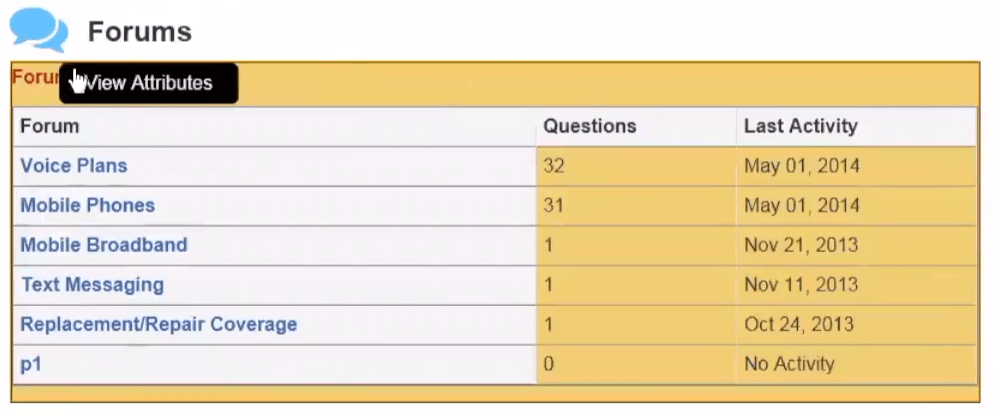
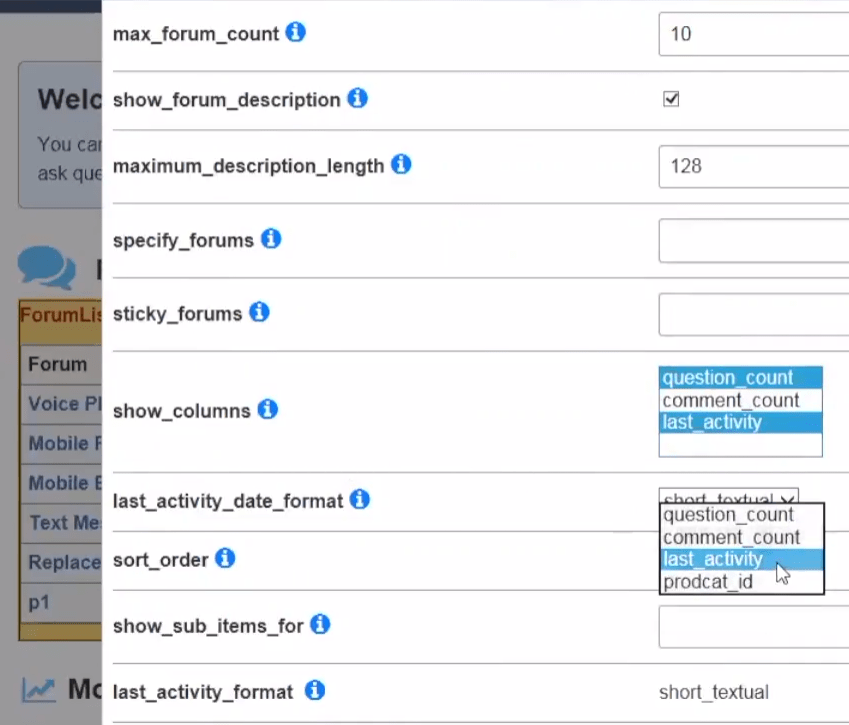
In terms of widget functionality, the 17.8 release brings a couple of new things. You can now select or pin a forum to the ForumList Widget on the home page, as well as set different sorting options – including sort by, last activity, questions, comments or Product ID.

OSvC_ForumList_Aug17.png

Additional sorting options are now also available in the QuestionList Widget, from last activity to a relevant time period – including sort by year, month, day, week or any date range.

OSvC_sort_Aug17.png

Lastly, customers will now also be able to quote other people’s comments when replying to them.

OSvC_quote_comment_Aug17.png

Platform – Custom Process Logging

The 17.8 release of OSvC adds a new feature that enables you (as a developer) to log errors and custom messages through scripts. You can access and review data logs, as well as enable or disable logging without code modification.

This allows you to debug runtime problems, with custom process scripts, during development and testing. Notice that two entities are used in custom process logging:

  • Terminals – The Terminal class provides the logging function. You define terminals in PHP scripts that you import into the Process Designer. The Terminal class is provided with Connect Common Object Model (CCOM) version 1.3 and later.
  • Probes – Probes control which terminals are used for logging. You create probes in the Browser UI using the Probe Designer.

Please notice that the Probe Designer is only available in the BUI, even though you develop the custom process models in the Console.

This capability must be enabled, via the ENABLE_CPM_LOGGING configuration setting, as it is not enabled by default. You should not be able to see this configuration setting, thus need to submit SR with Oracle support to request it.

You can find more information about this, how to use and setup in this section of the guide.

Platform – Connect v1.4

Connect v1.4 also brings some new features like consistency across Connect APIs. Included are metadata improvements, support for bulk APIs for delete and extract operations, and unified metadata for Marketing and Mail APIs.

Additionally it seems to also bring a correction to a bug that we found not long ago (and reported to Oracle Support) when we were extracting data from a custom object using the REST API, and found discrepancies on date fields (e.g. Start Date, End Date).

In the console/BUI workspace) we could see Start Date: 01/05/2017 and End Date: 30/04/1018. But in the response back from the API it was Start Date: 30/04/2017, End Date: 29/04/1018.

Platform – OpenID Protocol Support

OpenID-based single sign-on (SSO) is now supported, and will allow your agents to log in to multiple OpenID Connect (OIDC) providers such as Google, etc.

If you are not familiar with it, OIDC is widely used as an authorisation protocol based on REST, JSON, and OAUTH 2.0 standards.

It will be very useful for you be able to define and manage OIDC providers in the Browser UI, allowing your agents to SSO.

Among the various benefits of OIDC are the fact that it can be used for both web SSO and APIs, and unlike SAML, it can be used on mobile platforms.

To enable this capability you should ask Oracle support to enable the configuration setting SSO_ENABLE_EXTERNAL_IDP.

Platform – Bulk Delete API

This will give you the ability to delete large amounts of data (incidents and related data) using ROQL. In order to use it you will need to go to the Profile permissions (Admin area) and enable the “Bulk Delete” permission. Please notice that the 1,000 is the maximum number of records that can be deleted at a time.

Aug 17 Release now available (Part II)

The August 2017 (17.8) release of Oracle Service Cloud (OSvC) is now generally available and it brings so many exciting new features and enhancements that, this time, I am braking my thoughts down in various posts. You can read the first one here.

Browser UI – Report Inline Editing

With the latest release this feature is now supported in the Browser UI (BUI) allowing you to edit data in reports without having to open the object/record. If this capability is enabled in the report, you can edit the data in a field on the report cell, including fields of type drop-down menu.

OSvC_ReportInlineEdit_Aug17.png

Browser UI – Report Cross Tab and Forward

For those who are not familiar with it, Cross Tab is a feature of OSvC reports that allows you to compile, into a few lines, data that could span through various pages. This functionality is now supported at runtime within the BUI, with the 17.8 release.

Additionally it is now also possible, from the BUI, to forward reports and dashboards to other users (via email) using HTML format.

OSvC_CrossTabForward_Aug17.png

Browser UI – Guided Assistance and OPA Integration

One other thing that was still missing on the BUI was the ability to use Guides and OPA interviews, within a workspace – capability that has been available in the console. The new 17.8 release supports this functionality, allowing you to provide these very useful aids to your agents, which sometimes are key when supporting customers on the phone or over a live web chat session.

OSvC_GuidedAssistance_OPA_Aug17.png

Business Rules 2.0

Finally the best for last! As an OSvC expert and implementation specialist, this is probably one of my favourite enhancements for the last few releases. Oracle called it Business Rules 2.0 as it is a complete re-vamp of the Business Rules editor and capability.

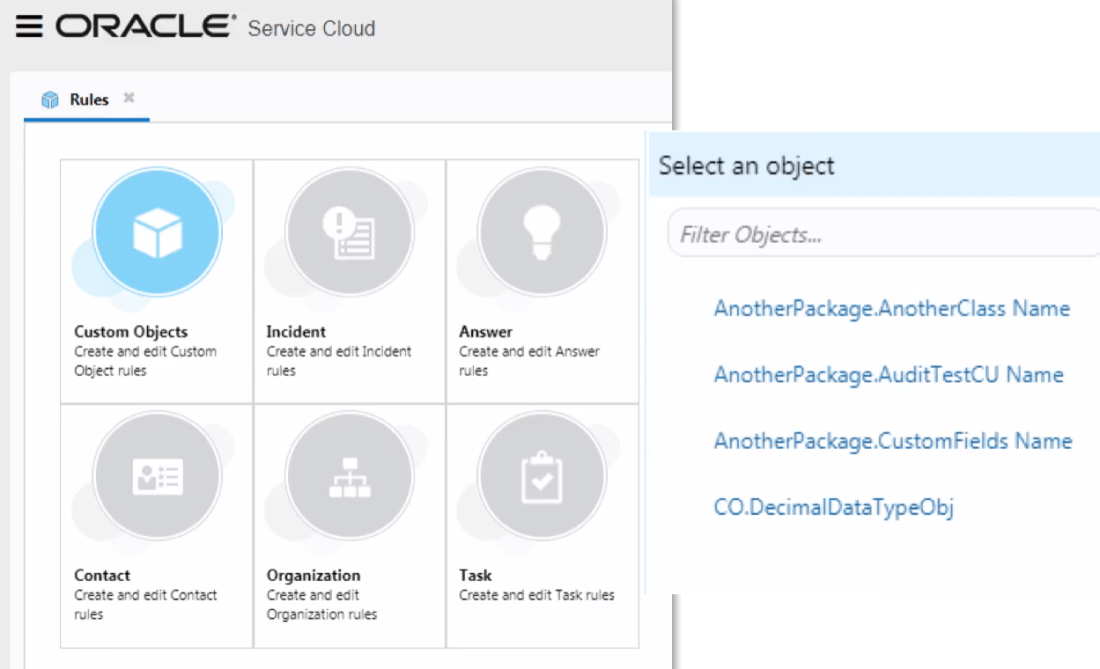
But caveats first… this is not yet available for standard objects, only for custom objects. It will come for Organisations, Contacts, Incidents, Tasks, and Opportunities further down the line. And it is available in the BUI.

The new Business Rules editor not only has a much more modern and intuitive look and feel, but it supports business rules for custom objects. Which means that you will no longer need to write as much code as you used to (in custom scripts/processes) if you need to create automation in custom objects.

OSvC_BusRules1_Aug17.png

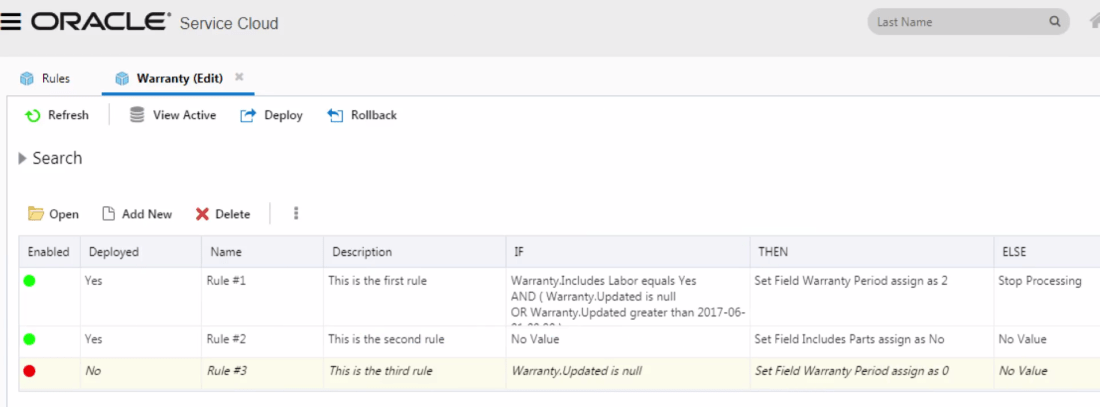
As an administrator or implementor you can view and manage all rules within a rule set (or object) at a glance.

OSvC_BusRules2_Aug17.png

And create new rules in a much more intuitive and easy to use interface.

OSvC_BusRules3_Aug17.png

Additionally, you can search for rules and values used within your rules.

OSvC_BusRules4_Aug17.png

Keep your eye on the next post – Aug 2017 release now available (Part III) – in which I will tell you a bit more about some of the most exciting enhancements in this Aug 2017 release.