Customer What? is definitely one of the best Customer Experience (CX) books I have ever read – and believe me, I have read many of them! Ian Golding promised us something and I feel he over-delivered. The books is just a fantastic guide for CX practitioners, and the description in cover is spot on: The honest and practical guide to customer experience.
It is indeed honest. Ian is absolutely telling the reader what he truly believes is the best approach and practice. As well as sharing what he experimented and used. Those who know Ian (I’m one of those privileged people) can surely “hear is voice” when they’re reading. The way it is written is the exact same way Ian would tell you.
It is surely practical. Ian is not trying to share concepts, beliefs or ideas. He shares some very important principles, for sure, as well as some very good ideas. But above all he is sharing practical actions, tasks, steps – those which have worked for him – and the detail. The biggest chapter is named “Making it happen in practice” and is actually about doing.
Furthermore, the book’s structure and layout is great and really focused on being a practical manual, rather than a book you read once and put in the shelf. There is a notes area in most pages (the only thing preventing you from having it always in your back pocket is the size) and all chapters have 3 sections: Theory, Practice, and Story.
Even there you can see Ian’s character in the book. I’m sure most people (or editors) would say that having personal stories in a book would not be interesting or relevant to the reader. But in this case Ian’s stories are absolutely crucial and spot on, to depict the key points he is making in each section. Just like being in his workshops!
Thank you Ian. Your book has not only taught me a lot, it has also been a fantastic guide and manual whenever I’m supporting my clients and my teams.
GDPR came into play 3 months ago, but companies are still struggling. One of the main concerns is related to the systems and databases where they hold customer data – be it personal, operational or experience data.
A significant number of Oracle Service Cloud (OSvC) administrators and super-users have recently contacted me, asking what actions to take to ensure they are GDPR-compliant. Like so many other technology vendors, Oracle is developing the platform.
Last week the OSvC product/development teams at Oracle and the OSvC All Stars got together to review the features available, look at the roadmap, and discuss what other solutions or developments could help the companies who use OSvC.
The truth is that the features that will help comply with GDPR are being released since 17C (Aug 2017), and there is a very busy roadmap, with other features coming.
1. The Bulk Delete API was released in 17C for Incident and Opportunity objects, expanded in 17D for Contacts and Custom objects, and expanded further in 18A for Accounts and Organisation objects. It allows you to efficiently delete large data sets, having the flexibility to select the data to delete using ROQL queries.
2. Until now, when you created a test environment, you would get a clone of your instance with all your data. The difference is that the emails had a .invalid suffix. Having real/production data in a test environment could be a GDPR breach. Since release 18B it is possible for administrators to create a test instancewithoutstandard transactional data.
3. Various enhancements to the Audit Log are going to be released in the next few versions of OSvC. 18C provides the ability to capture viewing of Contact records, as well as report downloads. 18D and 19A will introduce Field Level Audit Logs on individual attributes of the Contact object. And to answer your questions re. space, the Audit Logs will be written to a secondary store, unloading the primary database.
4. A Bulk Data Extract capability will be available from release 18D, for Incident and related sub-objects. This would be supported by an asynchronous REST API that will allow you to extract large volumes of data, into compressed .csv files. Enabling organisations to archive data that is old or not needed, but needs to be retained.
5. Deleting OSvC interfaces was something that companies struggled with, as it usually went wrong, impacting other interfaces. Since 18C this capability was enhanced by Oracle, allowing you to contact Customer Care and request interface deletion, to reduce database size.
6. The Data Lifecycle Policies user interface is available since release 18A, and allows you to easily manage data lifecycle policies for objects. In 18A it supported a limited number of transactional objects, 18B brought it to Incident archive/purge, and 18C for Custom Objects and indexed system attributes on Incident and Contact objects.
7. Finally, in release 18C you can redact or anonymise sensitive information in Incident Threads.
It is an interesting article, and you can see that the author put some thought on the topic, and tried to build a logic around it, and for that alone it is worth reading. However, I must confess it is the first time I see such a thing, even though I would not be surprised if someone told me others have already suggested changing the way to calculate NPS.
I completely understand where the author is coming from, and what he says may even make sense in certain scenarios. But, it would fall short if we look at it from various other perspectives. For example, in my home country, Portugal, the school grades are given on a scale of 0 to 20. Also, I think that a person with low expectations would easily give a NPS score of 10 for the same service or experience that a person with high expectations would class as a 8 or 9.
No system is foolproof, and applies to every scenario in the same way, or is interpreted by every person the same way. I think the way people react and respond will always depend a little bit on one’s idiosyncrasy. As well as one’s cultural, educational, sociological and economical backgrounds. Sometimes even one’s momentarily mood!
And it is probably recognising exactly that, that the NPS creators and the majority of CX practitioners and specialists, choose to respect NPS score/scale. There’s no point in trying to create multiple variations of the way you calculate NPS, otherwise every company would end up with a different way of calculating NPS, defeating the whole purpose of a standard and consistent way of measuring.
As we all know, NPS was created (and is a trade mark) by Fred Reichheld, Bain & Company, and Satmetrix. And the way it is calculated and measures is well explained in the official site – with Detractors (0-6), Passives (7-8) and Promoters (9-10).
What are your thoughts? Are you using the official NPS scale or diverting from it?
This week I decided to close a bank account that I have in Portugal and don’t use anymore. Expecting it would be quicker, I visited a branch, where I was greeted by one of the employees. In order to identify the account in the system, she asked me for a card associated, and then printed a few forms for me to sign. So far, so good.
To close the account, she said it was mandatory for me to provide both the credit and the debit cards associated with the account. As I don’t use the account, the credit card is in a drawer in London, and I was in Portugal. “Can you just inactivate the card in the system?”, I asked, only to see her face frown.
She continued to click and type on the computer, and until the end of the meeting never referred the credit card again or the obligation to hand it over. What followed was a request for me to sign two forms, which I did. “Sorry sir, can you please sign as per what I have in my computer”, she said, turning the screen in my direction.
I almost didn’t recognise the signature. My wife said, “Is that your signature?”. The signature was over 20 years old. Naturally, my writing had changed since, and I wasn’t able to recreate that. Her face frown again. “Well, you can check my id card. My signature is there”. Reluctantly, she accepted, and asked to copy the id card for proof.
Despite a few hurdles, all items in the close-bank-account list seemed to be ticked. But I had €2.19 in the account. She put the options to me: a) I could deposit €7.81, go to the cash machine (ATM) and withdraw €10. Or b) I could go to the teller and pay €5 to withdraw the €2.19. Needless to say, it was my turn to frown. I don’t usually like to be treated like a fool.
In any case, I didn’t want the €2.19 but could not contain myself and said the second option was non-sense. She responded “It is just the way it is. Rules are rules”. Again, I could not stay quiet, and told her it didn’t need to be that way, and it shouldn’t be that way. And that certain rules are just idiotic. She didn’t empathise with me.
I decided to try and explain. Put a smile on my face, and said “You know, it is not your fault. You’re just following orders. But the person that is comfortably sitting at a desk, on the 30th floor of the bank’s HQ, very well paid to come up with these rules, would probably need to come down, and visit the gemba”. Finally, she got me!
“Sir, if you don’t do anything, when the account is closed, they will send you a letter asking you to come in and get the €2.19. Then, you don’t have to pay or deposit anything to get the money”. She thought I would be happy with this hidden option c) and was disappointed when I frown again. “Really, and you think that makes sense?”, I asked.
At this point she was confused and probably thinking that I was one of those who is never happy. I tried to explain again. “You see, the bank will spend around €5 (paper, printer, post) to send me a letter, so I come and withdraw €2.19. Isn’t this non-sense?” Again, she got me, and nodded.
This is a very good and real example of where a bank is making up rules and policies that serve no real purpose, and sometimes make absolutely no sense. Killing the customer and employee experiences.
Rules and policies that will only increase customer effort, distrust, irritation and disloyalty. Also creating friction between customers and employees, who then get increasingly frustrated and feeling powerless.
We bump into similar things in retailers, telecom providers, hospitals, public services, etc. CX and EX killers which make no sense but amazingly aren’t eliminated, simply because there isn’t a process in place, to actually find them and measure their impact.
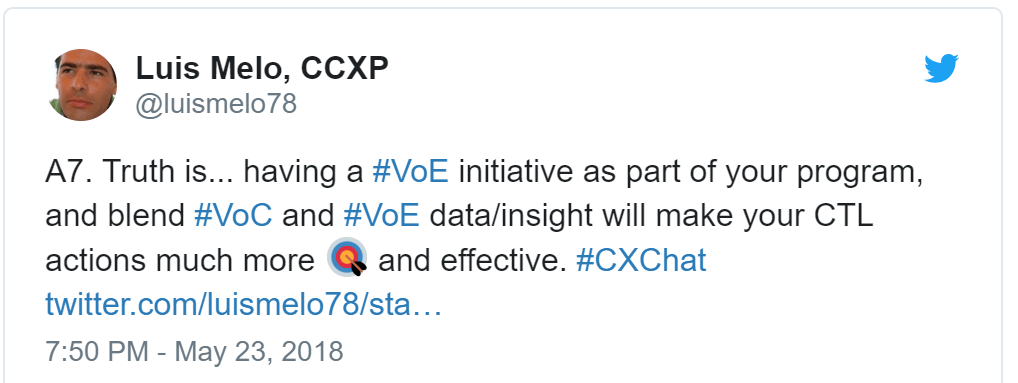
The first step to o find these CX and EX killers is definitely to put in place Voice-of-Customer (VoC) and Voice-of-Employee (VoE) initiatives. Without feedback, how will the policy makers understand the impact of their ideas? And how will the Experience Managers improve CX and EX?
On my blog post Break the fourth wall to improve survey experience I touched on the importance of Personalisation when it comes to design and build customer feedback surveys. But there are other things you should pay attention to, if you are truly interested in gathering your customers’ opinion.
KISS – Keep it simple
It is extremely important to follow the KISS principle and keep surveys simple. Often, we receive long and wordy surveys, which immediately put us off. We don’t have time, nor patience, to reply to lengthy questionnaires – Forrester recommends relational surveys to have no more than 15 questions, and transactional ones to have up to 10 questions.
Not long ago I received a survey invitation from Ryanair, in which they said it would take “no more than 5 minutes” of my time. But as soon as I got into the survey, I was advised it was not going to take “more than 10 minutes”. If I was already put off by the initial expectation, I surely was angry with the fact that it as misleading.
(Note: that was not the only reason I ended up not responding to the survey. The truth is that I don’t trust Ryanair’s intentions when it comes to VoC and CX, and I don’t believe they listen or care about customer’s opinions).
KITTP – Keep it to the point
It is important to follow the KITTP principle (just made it up!) and keep surveys to the point. If it is transactional, ask for satisfaction, touch-point, effort or resolution. If it is relational, add questions around brand, product or competition. But make sure you avoid cluttering the survey with further questions, and don’t try to do market research in customer feedback surveys.
Surveys should be engaging and enticing. And that only happens if they’re objective and to the point. Ideally, surveys are effortless and fun to complete. You can use tactics like telling a story or using emojis. But don’t go off in tangents and stick to the questions that really matter and will surface valuable insight.
Same applies to the email invitations. It is not unusual to see survey invitations that not only lack the company’s branding, but also contain too much text. Bin, is their immediate destiny. Don’t try and shoot two birds with one stone putting marketing messages or up/cross-selling , in a customer feedback survey invitation.
KIC – Keep it consistent
Lastly, it is crucial to follow the KIC principle (there I go, making up even more acronyms!) and keep it consistent. Avoid at all cost having silos in your organisation (departments, teams, etc.) sending surveys using different platforms, branding or, even worse, different or wrong scales.
(Note: For heaven’s sake, if it is not in a 0 to 10 scale, it is not NPS!)
Make sure you have a joint approach to customer experience, and consistent customer feedback initiatives. Use a platform that allows you to enable and deploy different voice-of-the-customer initiatives, in various channels, but at the same time ensures consistency across those initiatives and data gathered.
The 18B release of Oracle Service Cloud (OSvC) is now generally available and it brings some very interesting new features and enhancements, in particular to the Browser User Interface (BUI). I broke it down in separate posts. This is the second post (see the first here).
BUI – Chat Supervisor Monitoring
This functionality was available in the Dynamic Agent Desktop (DAD) or Console, and it is now also available in the BUI, allowing contact centre or team supervisors to monitor live chat sessions.
Similar to the functionality available in the DAD, supervisors can join or leave chat sessions, as well as send private messages to the agent. The functionality will be readily available if you have chat enabled, and you will be able to see a Monitor button is the following reports:
All Chats
Chat Supervisor Queue Snapshot
Chat Supervisor Snapshot
Current Chat Sessions
Chat Audit Report
Chat Supervisor Home Dashboard
BUI – Chat Knowledge Foundation Integration
This new feature will allow agents, using the BUI, to attach knowledge base (Foundation) answers to a chat session, as they would do when using the DAD. Agents can add answers as a link (see screenshot below), or as text, and they also have the ability to preview and print answers.
BUI – Respond Using Alternative Email
Some of you may be familiar with the configuration setting that determines how email responses will be sent to the customer – OE_SVC_SENDMAIL_SINGLE_ADDRESS. If enabled (set to “Yes”) email responses will be sent to only one address for the contact associated with the incident. If disabled (set to “No”) email responses will be sent to all email addresses captured in that contact record.
If it is enabled, the agent is allowed to choose which email address to use, primary email or alternative email. The screenshot below shows how the “compose” area of the incident thread looked like before, and what it will look like in 18B when you enable the configuration setting.
BUI – Workspace Field Label Font Properties
In previous releases the BUI would ignore , and not render, any changes in field label font properties – which you have available in the DAD workspace designer:
Font Family
Font Size
Bold
Underline
Italicize
Strikethru
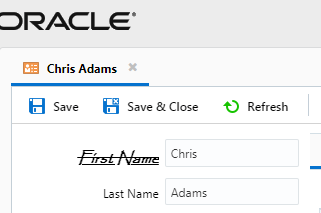
From release 18B onward, these are now available in the BUI. The screenshot below shows a BUI contact workspace, where you can see the “First Name” label which is set to Bold, Italic, Underline and Strikethru.
BUI – HTML Format Type Support for Workspace Answer Control
I’m sure most of you are familiar with Workspace Controls, which can be used to add features to the workspace (e.g. buttons, text labels, reports, tables, tab sets). Controls are added to workspaces from the workspace designer – find it in “Insert Control” tab.
One of the controls available in the incident workspace is “Answer Display” which displays a knowledge base (foundation) answer on a workspace. Once you added the control, you must select the answer you want, by setting “Answer ID” on the “Design” tab.
In previous releases, if you set the control to display an answer that had been created with type HTML, the BUI would render a link that the agent would need to click to bring up a separate browser window with the answer.
In 18B release, the HTML-type answer will now display in the BUI itself, and won’t require the agent to click any link to view the contents of the Answer.
Every Wednesday a group of Customer and Employee Experience enthusiasts joins #CXChat, a twitter chat hosted by @annettefranz and @sueduris. This chat is for CX and EX professionals to connect, learn and share best practices. And every week it has a new topic.
Two weeks ago the topic was Closing the loop with the customer on feedback and other items. A very interesting topic around which Sue and Annette launched a series of questions for discussion. Very interesting discussions and opinions were shared, which you can see here.
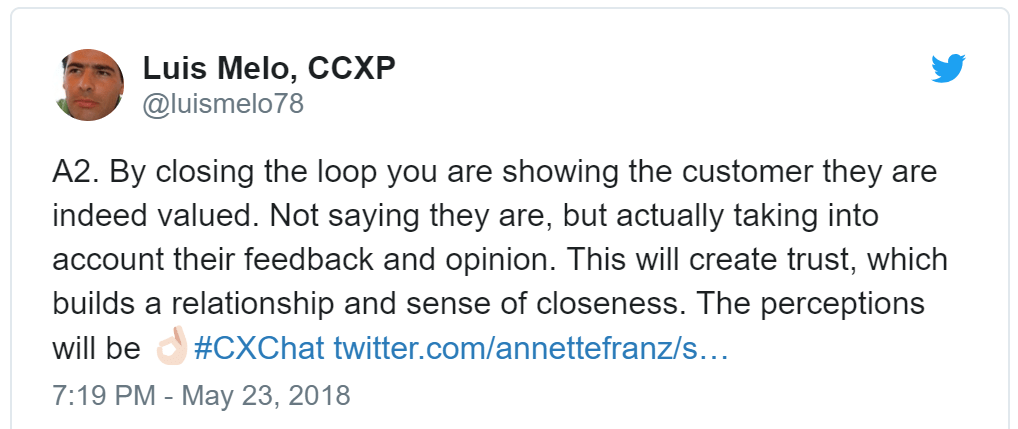
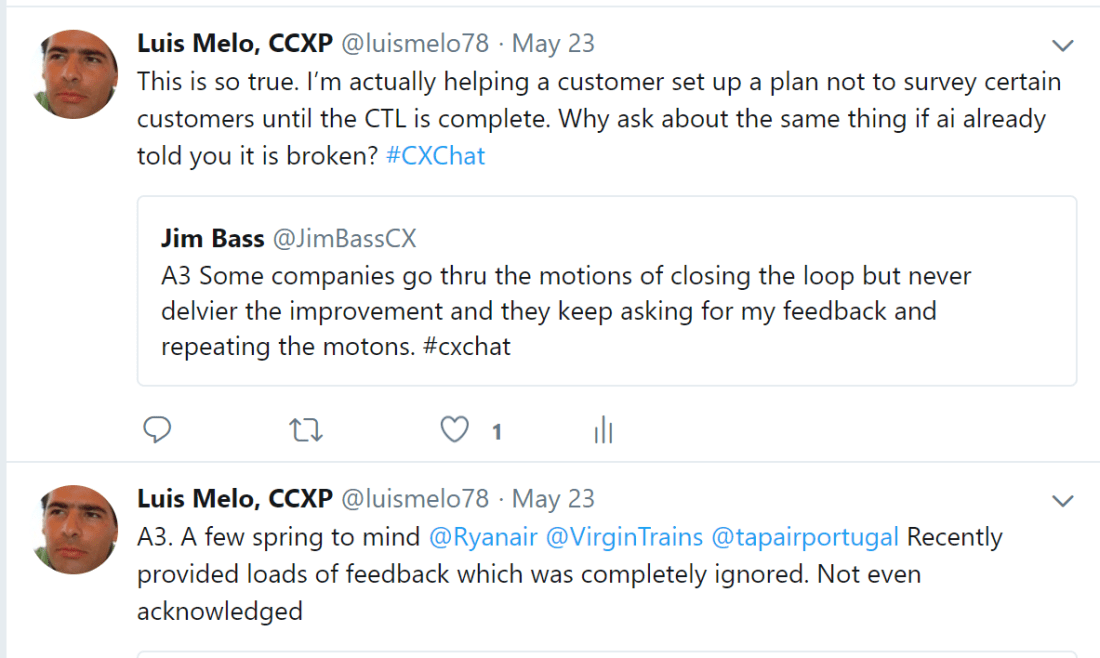
This topic is dear to me, so I participated and shared my points of view. Some of which you can see below (apologies for some misspelling, but I was using my smartphone).
Q1. What does closing the loop with the customer mean?
Q2. What is the importance of/are benefits to closing the loop with the customer? How does it help the customer experience?
Q3. What are examples of companies failing to close the loop with customers?
Q4. Can you measure whether you’re doing a good job with closing the loop with the customer? How can you tell?
Q5. What are examples of companies effectively closing the loop with customers?
Q6. If your CEO asked you to define a good closed loop process and provide best practices on how to manage it, what would you tell him/her?
Q7. Closing the loop on customer feedback isn’t just about following up with customers. How does your company close the loop with employees?
Q8. What are best practices for closing the loop with employees?
The 18B release of Oracle Service Cloud (OSvC) is now generally available and it brings some very interesting new features and enhancements. I will break them down in separate posts. This is the first post.
Chat – Virtual Assistant
One of those exciting enhancements is the launch of the Virtual Assistant (VA). Some of you may be asking “wasn’t the Virtual Assistant launched 5 years ago?“. Yes, back in Nov 2013 Oracle announced the VA which, at the time, was based on a separate product called Intent Guide and forced users to use a different application (login and user interface) to configure it.
The 18B release brings a much more integrated, seamless and powerful VA capability, which can be accessed, configured and fine tuned by OSvC administrators, using a VA editor in the OSvC interface. Nonetheless, it is still based on the aforementioned Oracle RightNow Intent Guide Cloud Service (find here the admin user guide).
This enhanced VA will hopefully be a step in the right direction and allow companies to not only decrease the volume of chat sessions that require an agent, but also improve the customer experience.
Simple questions with straightforward answers – aka high volume/low value queries – should be picked up and answered by the VA, using the information in the knowledge base. Making service more efficient and effective.
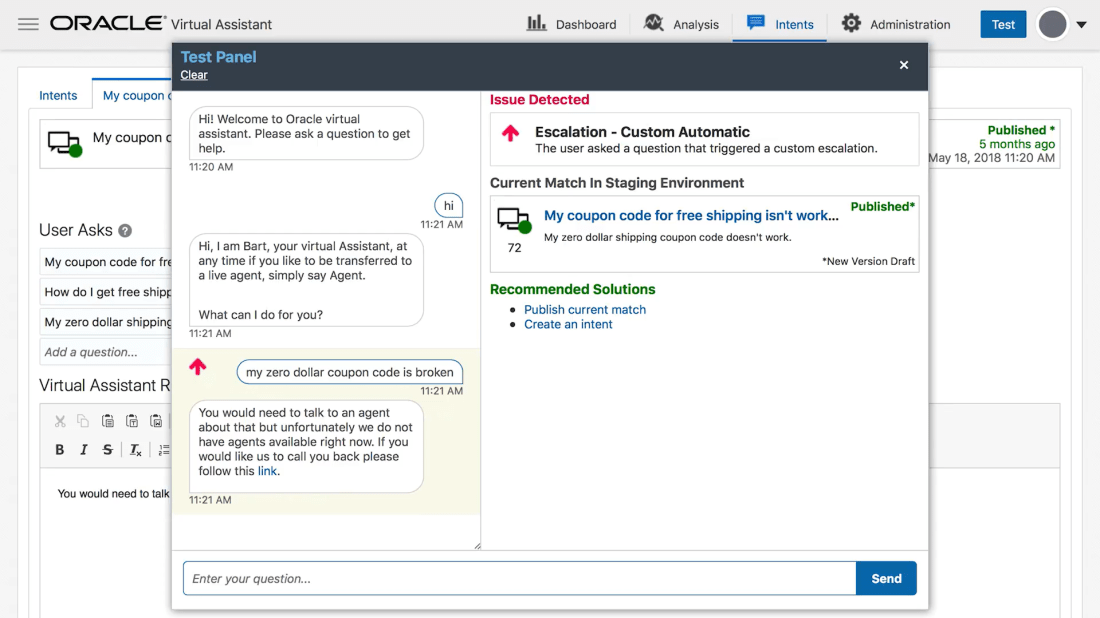
The new (or enhanced) OSvC VA allows you to configure escalation rules, that will route the chat session to the right queue and agent, when the VA cannot answer, as well as pass the conversation thread to the agent, for context.
Additionally it allows you to test scenarios and provides real-time dashboard so you can monitor performance and questions being asked, as well as identify new content that can be added to the VA and knowledgebase.
In order do use the VA you should ask Oracle (your account manager) to enable it and then perform the following steps:
Assign the Virtual Assistant Edit permission to your profile (you will find this permission in Profile > Permissions > Administration tab)
Add the Virtual Assistant editor to a navigation set (you will find this in Navigation Sets > Configuration > Components > Common)
Create the VA profile and account (to define the VA name that will display to customers e.g. “Siri”), as well as the VA chat queue (which will handle incoming chats and escalation)
Create chat rules to route virtual assistant chats and escalate virtual assistant chats to agents when necessary.
Note: You can have only one VA account and one VA queue. The VA profile, account, and queue cannot be deleted. However, account and queue names can be changed.
Oracle Service Cloud (OSvC) has circa 500 configuration settings, which control the platform’s functions. Some of them are commonly used but many are not that well known.
In previous blog posts (7 posts to be exact), I have been sharing a few that you might want to be aware of. This time, I share some that my fellow CX Heroes mentioned, in the Oracle Service Cloud Hero Hub, as being one of their favorite configuration settings.
If it is enabled (set to “Yes”) then OSvC will use the holidays table (which you can find in Configurations > Service > Service Level Agreements > Holidays) to determine whether the Live Chat should be enabled or disabled.
If your customers try to use the Live Chat channel on a date that is specified as a holiday, they will be shown a message stating it is a holiday and no agent is available.
The default value for this configuration setting is disabled (set to “No”).
SNEAK_PREVIEW_ENABLED
This configuration setting was mentioned by Kristine Tannert, from Insperity, who says that her agents love the Sneak Preview functionality, as it allows them to get ahead of the game and prepare responses on chat with the customers. This is particularly helpful since the questions their agents have to answer for customers can sometimes take awhile to investigate, so anything that helps them get a jump start on answering the customers question is appreciated!
It enables the Sneak Preview functionality, which allows agents to preview what a customer is typing prior to the customer sending the message.
The default value for this configuration setting is disabled (set to “No”).
INC_INCLUDE_POST_TIME
This configuration setting was mentioned by Robert Pozderec, also from Brother International Corporation, who said it is an extremely important setting when it comes to QA (Quality Assurance).
It specifies whether the post time is to be included in incidents created for a Chat session, meaning messages in the chat transcript will have a date and time against it.
The default value for this configuration setting is disabled (set to “No”).
CUSTOM_SCRIPT_DATA_SIZE
This configuration setting was mentioned by Sasi Gudimetta, from AST Corporation, who shared with the community that he usually works with reports that have custom scripts, and these have a query data limit, controlled by this setting, which needs to be increased to avoid the script from stopping after the defined number of rows, and the report output from being “No Value”.
It specifies the size of the data buffer (in bytes) used when processing custom scripts in Analytics.
The default value for this configuration setting is 50,000. The minimum value is zero (0) and the maximum value is 2,147,483,647.
Keep in mind increasing this to a large value causes the custom script to parse more of the report data (which is good!), but this also causes additional load on the server, which could result in negative performance impact for the overall site (not so good!).







 Doctor CX