May 2015 release is now available

Customer Content on the Login Screen

So far, the only thing we could do on the login screen was perhaps change the “welcome” message or replace the Oracle Service Cloud logo on the right-hand side by the logo of the company. The May 2015 release give us the ability to include links so we can enrich this entry point with some actionable messages (see image below).

OSvC_LoginWindow

Enhanced Incident Thread Masking

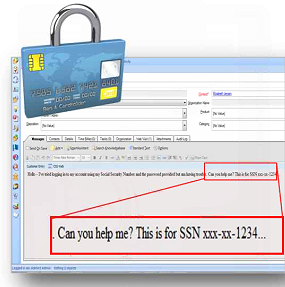
This functionality was introduced in the Nov 2013 release enabling organisations to better comply with internal governance and data privacy issues. Sensitive data, like credit card numbers is automatically masked with the use of patterns/regular expressions matching. These masks are applied to thread data, either entered by the customer or the agent. The data is modified in the database and the UI.

May 2015 release brings additional checks for 13-digit (Visa) and 14-digit (Diners Club) masking logic for credit card number patterns. This way the possibility of false matches is even more reduced.

New Social Monitor Results Report Column

A new column – named “Appended Incidents” – is now available in several Social Monitor reports. This column will have a “Click to View” link to allow the agent to drill down and see the incident(s) to which that particular tweet/post has been manually or automatically appended to. Then, the agent will also have the ability to double-click and open the incident straight away. This will make the navigation and association between social results and incidents much easier.

New Social Monitor Configuration Setting

The May 2015 brings the SOCIAL_MONITOR_CONVERSATION_TRACKING_DEADLINE configuration setting, that specifies the number of days that Oracle Service Cloud will track a conversation after an agent responds to a Social Monitor incident. Once the time period is exceeded, the incident will be removed from the conversation tracking, and any subsequent posts in the conversation will not be auto-appended as threads in the incident.

Service Collaboration

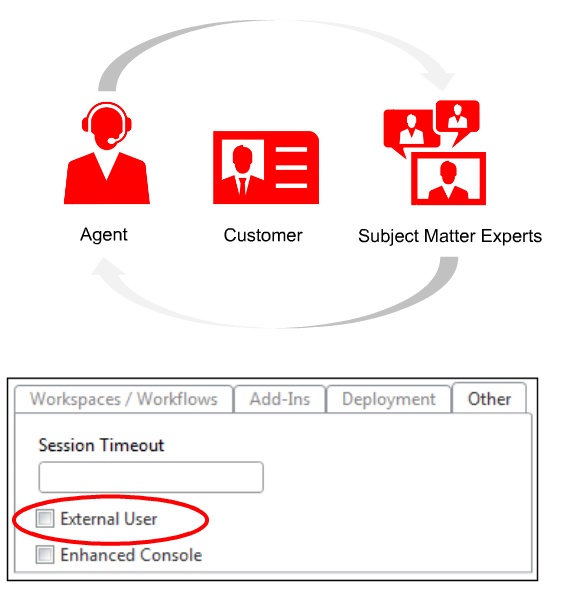
The May 2015 release brings a new collaboration functionality that, as far as I understand it, is somewhat replacing “Forward & Track”. The new service collaboration capability will allow agents to get help and support from third parties or external people that are not users of Oracle Service Cloud.
OSvC_ExternalUser

Those people can be set as users in Oracle Service Cloud, and associated with a Profile that has “External User” setting checked (see image above). Then, those users can collaborate in conversations with agents without being charged for licenses. They won’t be able to use the Dynamic Agent Desktop, but they can access the incident’s detail and message thread, by logging in to the collaboration service directly via a web browser or mobile device.

Advanced Knowledge

Limited to a number of Oracle Service Cloud customers, and still in a “trial” mode, the Oracle Service Cloud Knowledge Advanced capability was made available from this release, integrating in Oracle Service Cloud, some of the capabilities of the Oracle Knowledge product (aka InQuira). Some of those capabilities are related to authoring and intelligent search features like flexible templates, versioning, relationships between articles in multiple languages, search results from documents and other content sources. It also offers highly specialised NLP with pre-packaged industry specific terminology.

Single Sign-On (SSO) Support for External Identity Providers (IdP)

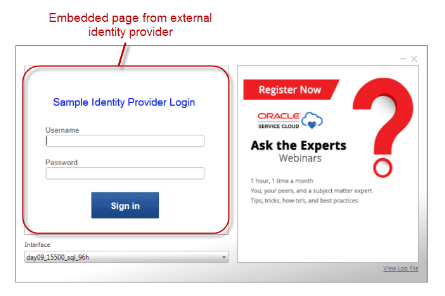
With May 2015 release, external identity providers (IdP) can now be used to log in to Oracle Service Cloud and other service provider (SP) applications, allowing agents to log in once and be authenticated across several SP applications. Similarly, single logout is also supported, for agents to log out of any SP application.
OSvC_SSO_IdP

If organisations are using an external IdP, the IdP login page can be embedded in Oracle Service Cloud Login window (see image above). This way, agents can log in without having to do it via a separate login page. After successfully logging in to the IdP, it will generate a SAML token and pass it to Oracle Service Cloud, increasing security, since usernames and passwords are not sent between applications.

Connect REST API

The May 2015 release of Oracle Service Cloud introduces the new Connect REST API, enhancing even more the capability of integration of Oracle Service Cloud with other applications and systems. Representational State Transfer (REST) API is complementary to the other set of APIs already in place, like Connect SOAP API.

For those who are not familiar with it REST is – somewhat like SOAP – an architecture for creating web services. It is, in some cases, an alternative to SOAP and WSDL-based web services. RESTful systems typically communicate over the HTTP, and may be simpler to create and maintain (if you want to know the difference between REST and SOAP, here is a good and short post).

Oracle Service Cloud Connect REST API is a public API that leverages the CCOM version 1.3. It follows the Oracle REST standard and supports CRUD operations.

Connect Common Object Model v1.3

May 2015 release of Oracle Service Cloud introduces version 1.3 of the Connect Common Object Model (CCOM). You can take advantage of this new CCOM version using Connect Web Services for SOAP (Connect Web Services), Connect PHP API, ROQL, and Connect REST API.

The new version of CCOM provides synchronized metadata among Connect PHP API, ROQL, and Connect Web Services, and provides operation-specific metadata in Connect Web Services. Also in CCOM version 1.3, ROQL blacklisting behaviour has been changed so that candidate blacklist queries are allowed to run by default and are subject to further analysis. Fifteen new operations and properties have also been added to CCOM.

Widget Changes on the Customer Portal (CP)

As always, various changes were done to a few widgets in the CP. To review those in more detail access the Framework change log in your CP by navigating to Framework > Framework versions or https://<your_site>/ci/admin/versions/manage/#tab=1&framework=3.2

Some of the changes were applied to the following widgets:

  • utils/CobrowsePremium
  • input/BasicProductCategoryInput
  • knowledgebase/GuidedAssistant
  • notifications/ProdCatNotificationManager
  • output/FileListDisplay
  • input/ProductCategoryInput
  • input/SmartAssistantDialog
  • search/ProductCategorySearchFilter
February 2015 release is now available

Private Messaging for Facebook

The Oracle Service Cloud Social Monitor is a very powerful feature to provide Customer Service over social media. It allows companies to listen, monitor and engage its customers, as well as people that are with the competition and may be unhappy and willing or open to change.

Companies can use the Social Monitor on Twitter, Facebook, YouTube and any blog or website with a RSS feed. But so far, private messaging could only be done via Twitter. Facebook was limited to the public feed and the company’s pages or profiles.

Best practice for Customer Service over social media is clear when it comes to a particular type of conversations (e.g. complaints). Companies should acknowledge publicly but take them off-line as soon as possible. For this, private messaging is crucial.

The February 2015 release of Oracle Service Cloud adds this functionality to the Facebook channel. It is now possible to monitor and respond to Facebook private messages, as well as transition between Facebook private and public messages in the same incident.

This also means that companies can now provide end-to-end interactions in all types of enquiries (not necessarily in a complaint scenario), as sometimes people need to share personal information with the Customer Service agent, and don’t want to do it publicly.

Mobile Compatibility for Co-Browse

The Oracle Service Cloud Co-Browse functionality is great for Customer Service over the web, as it enables agents to see what customers are seeing and guide them through web pages or forms, helping them to complete actions. By pointing or taking control.

The November 2014 release of Oracle Service Cloud already brought an enhanced Co-Browse capability, supporting more browsers, more complex browser technology, more platforms, one-click co-browse launching, and custom security.

The February 2015 release of Oracle Service Cloud brings even more enhancements, adding mobile compatibility, enabling customers and agents to co-browse from mobile browsers on any device during a live chat session or phone interaction.

Note: To use the newest version of Co-Browse, Customer Portal Framework Version 3.2 needs to be in place.

More Functionality for Browser UI

The Agent Browser UI was introduced in the previous release. It is still in “beta” mode but Oracle keeps working on it, adding more and more functionality for – what they call – infrequent users. Again, it is not intended to replace the Dynamic Agent desktop.

With the February 2015 release of Oracle Service Cloud users will now be able to access the Knowledge Base when working in an incident, share information with other users (by forwarding or bookmarking incidents), and also display dashboards.

Incident Archiving Improvements

Large companies with millions of customers may get to a point where they have too many incidents in the database, experiencing performance issues. Oracle Service Cloud Incident Archiving allows the archiving of old or outdated incidents.

Basically what this functionality does is it removes incidents from the database and stores them in searchable files. Archived incidents information is made read-only and cannot be updated. This can happen automatically after a certain period of time.

Setting the ARCHIVE_INCIDENTS configuration setting determines when solved incidents are archived. But they can now also be permanently deleted by the use of the new configuration setting: PURGE_ARCHIVED_INCIDENTS.

Draft Incident Responses

Sometimes a user may be working on an incident (e.g. an email response) and need to jump into another task (e.g. a more urgent incident). To avoid having multiple tabs or windows open, the February 2015 release of Oracle Service Cloud allows saving draft incident responses.

A user can craft the response, select cc or bcc addresses, add attachments, etc. and then save the incident with that draft response to complete and send later. The draft response is copied to the message thread panel and can still be edited before sending.

Session Hard Timeout

For obvious security reasons companies require that user’s inactive sessions are automatically logged out. Currently it is possible to do this by configuring a profile setting (Session Timeout field) and a configuration setting (CLIENT_SESSION_EXP).

Once the time of inactivity exceeds the time set in these settings the client sends a soft logout request to the server. When attempting to access the Agent Desktop again, users will receive a Console Locked message asking for re-authentication.

The February 2015 release of Oracle Service Cloud brings a new level of security. The session hard timeout forces users to re-authenticate after a pre-defined period of time, offering extra security for companies that required thorough compliance (e.g. PCI, DISA).

This functionality can be set using the new SESSION_HARD_TIMEOUT configuration setting. Users will be alerted 5 minutes before their session is set to expire. After re-entering login credentials, users will be authenticated, a new session will be created, and the session ID will be updated throughout the platform (including Add-ins, APIs or Co-Browse).

Bounced Incident Response Handling

It is not surprising to anyone that sometimes email messages bounce. It also happens with incident responses sent from Oracle Service Cloud, and sometimes it is difficult, if not impossible to handle those bounces.

The February 2015 release of Oracle Service Cloud brings new functionality to handle those incident responses that are returned. There is a new source in the Transactions table that will allow Techmail utility to flag those bounces: “Techmail – Incoming Auto-Reply Message”.

This will obviously be very useful for the creation of reports – e.g. listing bounced incident responses – or business rules – e.g. set incident status to “bounced” or back to “unresolved” if source is Techmail–Incoming Auto-Reply Message – enabling Customer Service teams to re-contact the customer using the same or other contact channels.

November 2014 release is now available

Visitor Browser History

When dealing with an incident coming from the Ask a Question page in the Customer Portal a staff member could see the customer’s browser history. For that he just needed to go to the “Web Visit” tab (part of the standard Incidents workspace), which showed the out-of-the-box report “Incidents Web Visit Tab”. That report showed list of all actions and pages the customer visited before submitting the incident – as well as the customer’s IP address, OS, and browser.

This was something that many companies using Oracle Service Cloud were requesting for chat engagements too. The “Page Peek” functionality was released one year ago, but it was not enough for some. It showed a snapshot of the page the customer was visiting before requesting a chat session, but not the whole journey.

The new “Visitor Browser History” responds to the requests of Oracle Service Cloud users. It enables staff members to view the pages that the customer has visited, when engaging via the chat channel. Similarly to “Page Peek”, the “Visitor Browser History” will work alongside Engagement Engine.

Dock Tools Windows to Status Bar

The Dynamic Agent Desktop is, in my point of view, one of the greatest assets of Oracle Service Cloud. It is fast, efficient and most of all flexible. But some users would sometimes struggle with the lack of space in the console, particularly when working in smaller screens. It seemed that more functionality meant less space.

In the previous release Oracle started to address that. The big chat media bar across the console and below the ribbon was replaced by a small media bar on the top-right corner. Furthermore, the tools windows could now be re-located and collapsed.

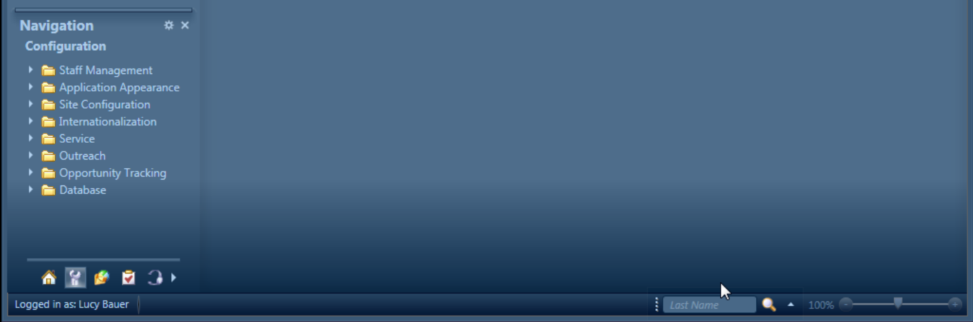
With this release, Oracle gives even more flexibility. Staff members can now dock any of the tool windows – Recent Items, Quick Search, and Navigation – to the Status Bar. This means they will have even more space and freedom to re-arrange the UI. (see below the Quick Search bar docked to the status bar).

image8

Context and Pinned Recent Items

The “Recent Items” section was always useful as it displayed the records and items a staff member was working on recently. But the truth is sometimes the list could get long and sometimes not big enough for the number of records a staff member opened in a short period of time.

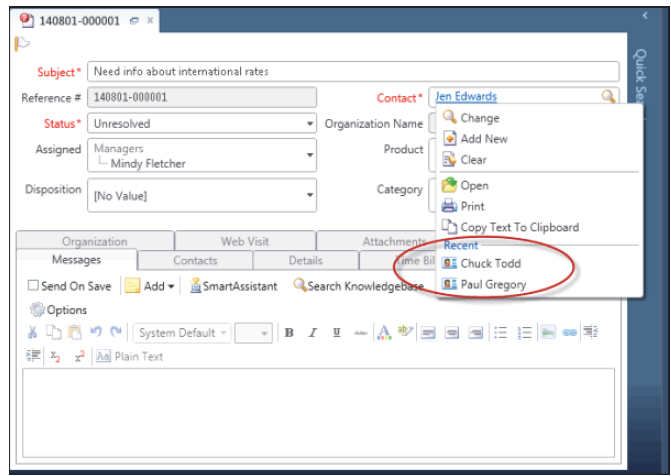
The new release of Oracle Service Cloud will allow staff members to select items from the context menu in search fields. An example is: when opening a contact from a contact search field in an incident, the menu will display other recently opened contacts (see screenshot below). Notice that this will only work for incidents, contacts, organisations, tasks, chats, assets, custom objects workspaces.

image1

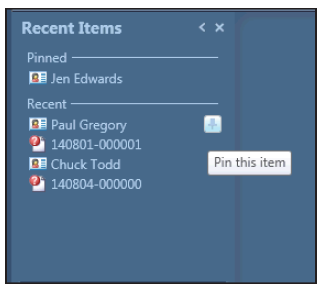
On top of that, staff members will also be able to pin recent items. For that they just have to click the pin icon that displays when hovering over a recent item. Those pinned items will be fixed at the top of the “Recent Items” tool window.

image3

Enhanced Drop-Down Menus

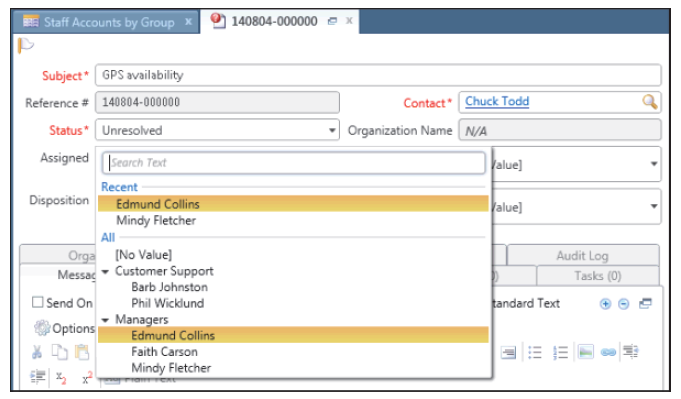
Sometimes a long list of values in a drop-down menu could be a pain for staff members, forcing them to scroll down to find the right value. The new release of Oracle Service Cloud brings an enhanced drop-down menu capability, displaying the last 10 selections at the top of the menu (in a section labelled “Recent”). Furthermore, the list of values will be sorted alphabetically and filtered as the staff member types the letters.

image2

Sub-Tabs in Message Template Editor

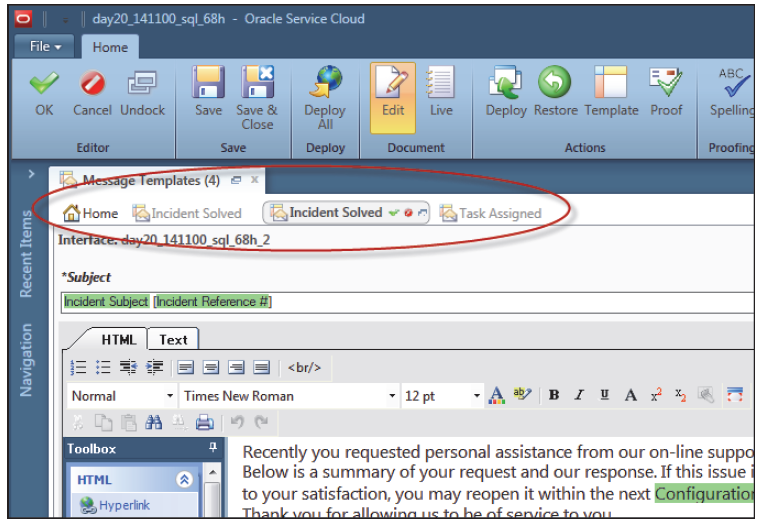
Any experienced admin knows that it was only possible to edit one Message Templates at a time. This is due to the fact that when selecting a Message Template and clicking the “Edit” link, the Message Template editor opens in a new window, and it is not possible to open a second one.

The Nov 2014 release brings a new Message Template editor that uses the sub-tab functionality (introduced in the Aug 2014 release). This means that it is possible for an admin to edit more than one Message Template at the same time.

image4

Conditional Subject Lines and Content for Message Template

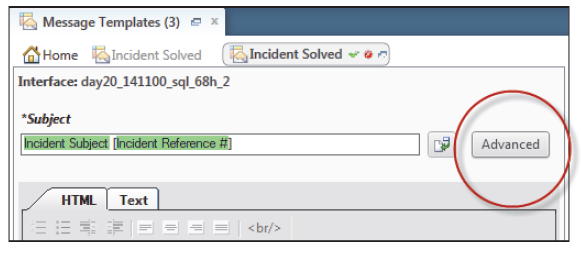
Furthermore, the new release lets admins create conditional subject lines, in order to have different subjects for different types of customers. By using advanced subject editing it is possible, for example, to change the subject line dynamically based on product, category, or any other custom field. Notice that it is possible to add up to 10 conditional subject lines per Message Template.

image5

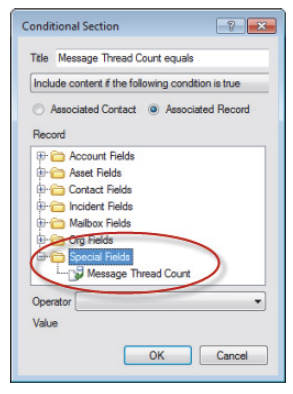
And that is not all for Message Templates. It was already possible to include conditional sections in Message Templates using a variety of fields, but now admins can also define the content to show, based on the number of threads included within the sent message, using the Message Thread Count record located in the “Special Fields” folder (see screenshot below).

image6

Email Response to Single Address

Before, if a customer had more than one email addresses, a response from a staff member was sent (by default) to all those mailboxes.

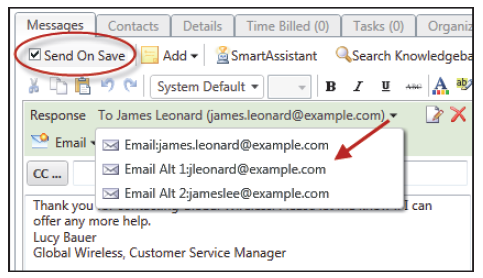
Now, with the Nov 2014 release, staff members can select a single email address for the response and limit the responses to be sent to a single email address. For that, admins need to enable the OE_SVC_SENDMAIL_SINGLE_ADDRESS configuration setting (that can be found in Common > General > Outgoing Email).

Notice that the default value for the response is the primary email address. However, if an incident is created from the CP, chat session or by the Techmail, the value is set to the email address the request was sent from. That email address will remain for the life of the incident.

image7

New Merge Fields for Survey Notification Message Template

The Survey Notification message template would allow admins to use merge fields from Account, Contact and Surveys, as well as some special fields.

With the Nov 2014 release, admins can also use merge fields from Chat, Incident, Opportunity and Question Sessions.

Support for IPv6 Values

From the Nov 2014 release, fields and URLs used on the Dynamic Agent Desktop can now support IPv6 values (Note: IPv6 is intended to replace IPv4, which still carries more than 96% of Internet traffic worldwide as of May 2014).

Single Sing-On (SSO) Enhancement

This functionality was introduced a few releases back, but the information describing the service providers a staff member was logged in to using SSO was stored in a cookie located on the user’s machine.

From now on, that information is stored in a table in the database, removing any constraint in relation to the number of service providers a user can be logged in to, as well as enhancing security since the logout process continues regardless of the user’s browser closing before the process completes.

Furthermore, the SSO SAML token can now support multiple sites, meaning that the SSO framework supports the seamless exchange of SAML tokens across different interfaces of a site that are on different domains, preventing users from being asked for login credentials if they log in to one interface and then try to access a service provider that is configured on a different interface located on a different domain.

Invalidate Password

Admins will now see an “Invalidate Password” check box when creating or editing a staff account. This option will let admins invalidate a staff member’s password, disabling at the same time the “Change Password” button.

This functionality brings best practice in terms of security. Before, the admin would send the password via email to the staff member. Whereas with this functionality the staff member is forced to request a password reset using the “Login Help” (on the Login window).

The “Login Help” requires the staff member to have a valid email address, and uses a form post to reset the password. After the staff member resets the password, the check box is automatically cleared.

Skill Requirement Relaxation Timer

Chat Advanced Routing was introduced in the May 2014 release, making it possible to route incoming chats to agents based on their specific language, product skills and workload.

This functionality was now enhanced with the Skill Requirement Relaxation Timer, which improves the assignment of chats to staff members based on their skills while eliminating long wait times for customers to be matched with a staff member with the right skill set.

Enhanced Co-Browse

Co-browse has been part of Oracle Service Cloud for a long time. It is a functionality very much appreciated by companies that use this platform.

The Nov 2014 release brings an updated version of co-browse making it support more browsers, complex browser technology, computer platforms, one-click co-browse launching, and custom security.

The only thing to be aware of is that this newest version of co-browse will only work with the Customer Portal Framework Version 3.2. and there are two new widgets in the CP:

  • chat/ChatCobrowsePremium
  • utils/CobrowsePremium

Search Dialogue Enhancements

Two enhancements have been added to make it easier to use menu fields with a large number
of options when searching reports and dashboards.

  • Search text area: Staff members now have a search text area where they can start typing the value they want to locate. As they type the letters the menu changes to display only the values that match the text that is being typed.
  • Splitter bar: A splitter bar was also added to the menu filter. Clicking the bar expands the list of menu items to display the menu items a staff member has selected. The list of selected items is not displayed by default, but can be expanded and saved as the default layout by report users and when editing reports on the report designer.

Oracle Service Cloud Roadmap

The usual quarterly releases have brought many great improvements to Oracle Service Cloud, in terms of functionality enhancements or new features. But there is still more to come in the next releases. The Oracle roadmap for Oracle Service Cloud has a lot of new stuff for the coming 12-18 months, of which I highlight:

Virtual Assistant

  • Enhancements to the VA will improve the conversation. More than being able to chat with the customer, the VA will suggest questions & answers based on the web visit.
  • A tighter integration between both products – Oracle Service Cloud and Oracle Virtual Assistant (formerly known as Intent Guide) – will make it easier to integrate and will allow shared admin (currently, to configure VA admins have to use different UI / login).
  • VA will be available to be used in any web page, by the use of a Syndicated widget. Currently it can only be used in Oracle Service Cloud Customer Portal pages.

Community

  • A tighter integration between both products – Oracle Service Cloud and Oracle Service Cloud Community – will allow shared admin (currently, to configure Communities admins have to use different UI / login).
  • Oracle Service Cloud and Oracle Service Cloud Community will use the same structure (taxonomy), which means that answers in the Knowledge Base and in the Community forums will have same categorisation. This will improve search results.
  • The communities (Support and Innovation) will be available not only in the Oracle Service Cloud web Customer Portal but also for mobile devices.

Syndicated Widgets

  • To add to the current Chat (re and proactive), Knowledge and Surveys widgets, more syndication widgets will be made available for social, incident management, polling, etc.
  • These new widgets will also bring more power to the developers and admins, offering more control in terms of when and how widgets display.
  • Last but not least, developers will have the possibility to create Custom Syndicated Widgets, in order to create business-specific / requirement-specific widgets to be used outside the Oracle Service Cloud Customer Portal.

Skills Based Assignment

  • The May 2014 release of Oracle Service Cloud brought this great new feature, that applied to the incidents coming from the Chat channel, making it possible to route incoming chats to agents based on their specific language, product skills and workload. In the roadmap Oracle states the intention to expand this feature to other channels.

Oracle Social Network

  • The August  2014 release introduced internal collaboration by integrating Oracle Social Network (OSN) with Oracle Service Cloud. In the roadmap is enhances functionality that will allow prioritised incident collaboration, and expert locator (based in categorisation), as well as make this available on mobile devices.

Dynamic Agent Desktop

  • The greatest and more pressing (in my opinion) thing is also in the roadmap and everyone is looking forward to have it. It is the new browser UI (i.e. the Dynamic Agent Desktop thin client). According to Oracle it will work in any platform and browser (Chrome, Firefox, IE, Safari).

August 2014 Release is now available

The August 2014 release of Oracle Service Cloud (formerly known RightNow CX) is now available. This time there’s nothing extremely exciting but it brings some considerable changes and very useful features.

First and foremost, the platform is no longer called “RightNow CX”. Oracle officially renamed it to “Oracle Service Cloud. You might have noticed that I’ve been doing that for the last few weeks, and already change the labels in the blog.

Oracle Social Network – Collaboration
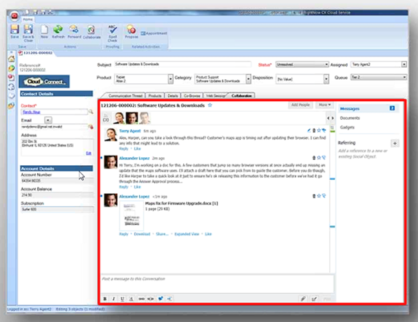
To increase (internal) collaboration Oracle has integrated Oracle Social Network (OSN) with Oracle Service Cloud. From within the Agent Desktop, in the Incidents workspace, agents will have a button on the ribbon that will open a window with a list of their peers. The conversation can take place in the “Collaboration” tab and include multiple agents.

5_collaboration chat

Chat – Routing Rules
Chat routing rules was improved to make sure that chat requests are always routed to the agent that has the fewest number of active chat sessions. This will not only balance (even more) the agent’s workload but also decrease the customer waiting time.

Custom Objects – Limitations
Menu-only objects (created to populate menu options in menu-type fields in Custom Objects) will no longer be included in the limitations imposed by Oracle regarding the object designer. This includes not only the limitations in terms of the amount of custom objects in the system but also the limit of 200 objects when deploying and 25 objects when importing.

Surveys – Results by Agent
The new release allows companies to track survey results by agent. The agent assigned to the record at the point of shooting the survey (e.g. incident after chat) will be associated with the survey, which means that reporting can then be filtered by agent with accurate results, even if in the meantime that record was assigned to another agent.

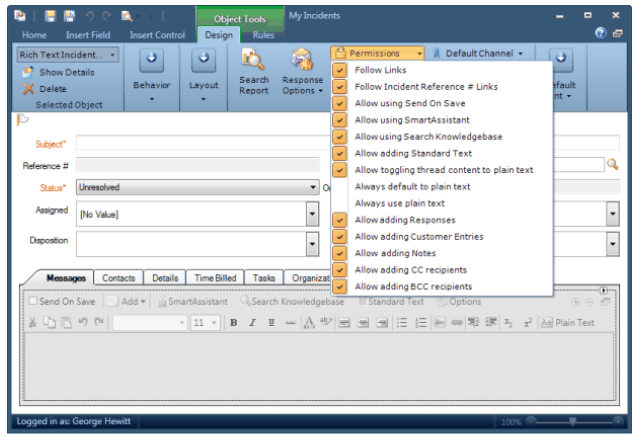
Incident Thread Message – Rich Text
New rich text options are available in the Incident Thread control (used in the Incident workspace). These include a) always default to plain text and b) always use plain text.

1_New rich text incident thread control

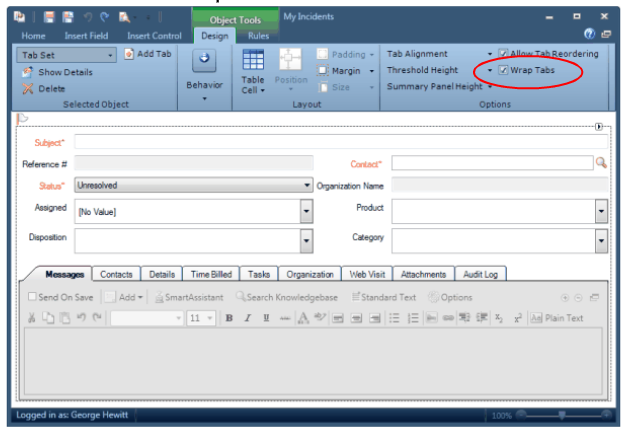
Workspace – Wrap control
Workspaces will have a new “Wrap” tabs control option that will allow the consultant to determine if the workspace or script tab is going to be displayed across multiple lines or on a single scrollable line.

2_New wrap tabs control option

Cross-site Email Management
A new feature is available to send emails with incident information from one Oracle Service Cloud instance to another – which only makes sense if a company uses more than one instance of Oracle Service Cloud. The only limitation is that both need to be in August 2014 version.

Configuration Settings – IPv6
A considerable list of security-related configuration settings can now support IPv4 and IPv6 addresses. A few examples are the ones who define which hosts are allowed to access the interfaces: SEC_VALID_ADMIN_HOSTS, SEC_VALID_ENDUSER_HOSTS, SEC_VALID_CHAT_API_HOSTS

Customer Portal – Widgets and Custom Objects
Various updates were introduced in this release including increased support for Siebel integration (v. 8.1.1.7) and a new CP Framework version (3.2.3). Changes include updates to various widgets (e.g. ConditionalChatLink, DateInput, SelectionInput, TopicBrowse, FieldDisplay, ResultInfo, SimpleSearch) as well as allow custom objects menu attributes to be used with FormInput and DataDisplay widgets and the rn:field tags for Contact and Incident objects.

API – Connect PHP
The Connect PHP API was extended with the introduction of the public mail API. Using this new API it is possible to bypass internal SMTP mail server and associated whitelisting (legitimate email addresses and IPs) requirements.

Single Sign On – SAML tokens
The new release of Oracle Service Cloud now supports on SAML tokens, additional users information commonly requested by Service Providers.

ROQL – New objects
ROQL was also extended to improve the ability to leverage the Connect Common Object Model in external applications. With the introduction of the SystemInformation sub-object, API consumers can now return data sets up to 100,000 records. The introduction of the ArchiveInformation object (that exposes table delete_recs) will enable the extraction of delete records. DistributionEmailList and DistributionEmailAddress now expose mail_list, mail_addr and mail_list2addr tables, allowing access to information about distributions lists, prevent whitelisting and avoid direct SQL queries.

May 2014 Release is now available

The May 2014 release of Oracle RightNow CX (aka Service Cloud) is now available. As usual there are some great new features and functionalities. Here are the main ones…

Enhanced User Interface for the Dynamic Agent Desktop

The console has an enhanced User Interface, much more flexible and faster. It allows users to change the layout by undocking, moving, removing and re-ordering controls, tool windows and admin workspaces. These can now be dragged into another screen or even to the new navigation pane that had been added to the right of the content pane.

 DAD-1

A new concept of sub-tabs was introduced. When a user opens an associated record (e.g. open a Contact in a context of an Incident), that record’s workspace opens in a sub-tab, rather than in a new tab.

DAD-SubTab

In Analitycs, it is now also possible to customise the search window layouts of reports and dashboards.

DAD-Analytics

New Feedback Surveys for Mobile Devices

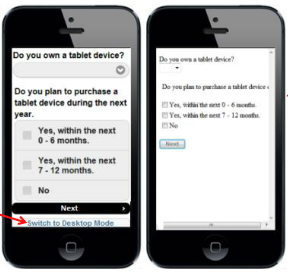
It is now possible to create surveys that will automatically optimised when accessed through mobile devices. RightNow is able to detect whether a survey is being taken on web or mobile device and adapt the landing and questionnaire pages. Nevertheless, there is an option to “Switch to desktop mode”

MobileSurveys2

To further optimise the surveys, Conditional or Case sections can be added in order to show different content for web and mobile devices (e.g. an image used in the survey may be smaller for mobile devices).

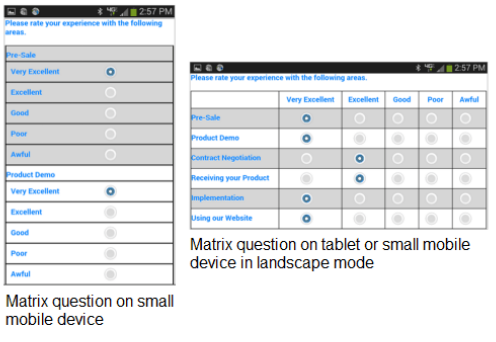
Matrix questions will be rearranged to display vertically on small mobile devices (less than 400 pixels).

MobileSurveys_Matrix

Mobile look & feel can be checked when building/designing the survey by using the new “Mobile Preview” feature.

MobileSurveys_Preview2

The following new reports where added to the list of standard reports in order to analyse Web/Mobile survey trends:

  • Mobile Survey Trend
  • Mobile Survey Browser Trend
  • Mobile Survey OS Trend
  • Standard vs Mobile Survey Trend

Object Event Handler in Rules, Surveys and Campaigns

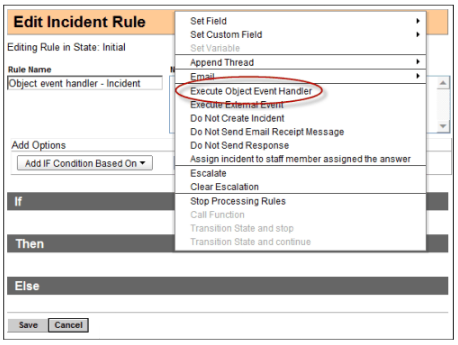
It is now possible to invoke Object Event Handlers from Business Rules using PHP that can be associated with CRUD operation in standard or custom objects.

ObjectEventHandler_BusRules

It is also possible to add Contact-related Object Event Handlers using PHP that can be associated with CRUD operations on Contact objects used in Surveys and Campaigns.

ObjectEventHandler_Surveys

Single logout for SSO

If using Single Sign On (SSO) to login to other apps and RightNow as the Identity Provider, agents can now be automatically logged out of all service providers they are logged in to, either applications are external or internal (e.g. OPA) to the Oracle Service Cloud.

Enhances Siebel Integration

The new version of the framework allows the use of the Customer Portal with version 8.1.1.11 of Siebel. This means that Siebel customers can use the RightNow Customer Portal alongside Siebel without having to implement the complete RightNow solution.

This way, questions submitted on the “Ask a Question” page of the RightNow Customer Portal will be directly converted in Siebel Service Requests, rather than creating a Incident in the RightNow database (that then had to be sent/created to Siebel).

Customer Portal
The new version of the framework includes “View Partials”. These are chunks of code that can be used/re-used in multiple places in a widget or shared across multiple widgets, in order to avoid code duplication.

New Objects available for ROQL queries

The new version of RightNow lets API clients access (using Query CSV() operation) the following objects for ROQL queries:

  • SystemInformation object to retrieve a list of API versions that are supported for a given site.
  • ReleaseInformation object to retrieve RightNow release information (e.g. release date, service pack level, build number, patch level) and other version details for a specific site.
  • PerformanceRecords object to retrieve information related to incident performance and import into data warehousing solutions for further analysis and reporting.
  • “Mailbox” – Mailbox object to prevent direct SQL queries and whitelisting

Chat Advanced Routing

It is now possible to route incoming chats to agents based on their specific language, product skills and workload.

Furthermore, it is possible to designate primary agent responsibilities, overflow coverage, and VIP queues without needing to make changes in real-time. Experience Routing provides prioritization and assignment control to meet business objectives.

New reports where added to the list of standard reports in order to track performance of advanced routing of chat sessions.

Enhanced SRM Integration

In the new release RightNow leverages SRM’s noise filtering and semantic analysis. Also the Social Monitor will now execute searches every 5 minutes (previously searches were done every 15 minutes).

RightNow February 2014 Release

The February 2014 release of Oracle RightNow CX (aka Oracle Service Cloud) brings a huge list of great and exciting new features and capabilities that will benefit agents and customers, enhancing the user (UX), customer (CX) and also developer experience!

Web Experience

Virtual Assistant capabilities were improved. To add to the human-like conversational language capabilities that truly understand the customer’s request and intent, Virtual Assistant has now visibility on the customer profile and interaction history, providing a more personalized, quick and simple dialogue. There are also some new OOTB reports around Virtual Assistant to track efficiency and effectiveness of this assisted service.

Community Support Search will enable the search to be a blend of answers in the knowledge base and posts from the community. This will not only make it easier and quicker for the customer to find the answer to his/her question but also prevent duplicate posts in the community or interactions to the contact centre assisted channels (more costly).

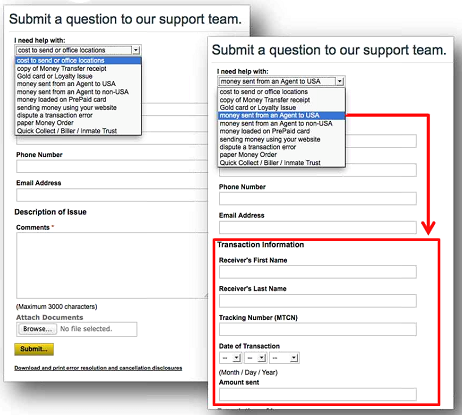
Dynamic Forms API was built and will make it easier to create dynamic forms (e.g. Ask a Question page). Until now developers had to write custom code (using the JavaScript API) to have a form-type page to respond dynamically based on the customer’s action. But from now on, using the Dynamic Forms API they can add dynamic options that are triggered by selection in drop-down menus.

image 1

Contact Centre Experience

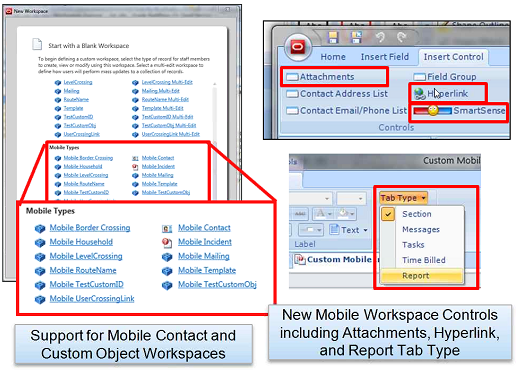
Agent Mobile App has now full support for Custom Objects, which means that every custom object can be exposed and have a workspace in the mobile app. It also has enhanced mobile workspaces with new controls that allow developers/super users to embed analytics, surface external websites, and display SmartSense controls. On top of that, agents are now allowed to upload pictures from their iPhone as attachments as well as search the knowledge base and add answer links to the incident response. Admins can also create a mobile navigation set.

image 2

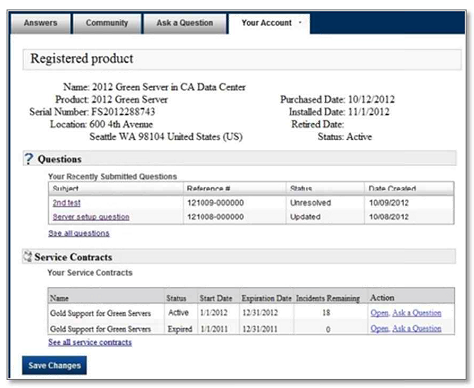
Asset and Product registration is finally coming in this release. Asset is now a standard object and there is functionality that allows asset registration and management. Customers can register their assets and view the service history through the Customer Portal, and Agents can update the registration on the Agent Desktop, as well as have a full view of the asset service history. There are OOTB widgets and pages that developers can use in the Customer Portal in order to create asset registration pages. On top of this, assets can be associated to specific SLAs.

image 6

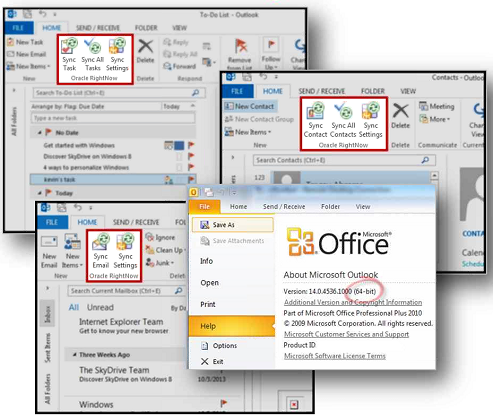
Microsoft Outlook Integration for 64-bit is now available and therefore users that have MS Outlook 2010 and 2013 (64-bit) are able to synchronize emails, contacts and tasks.

image 9

Message templates enhancements were made in order to improve the HTML editors in message templates, making it easier to customize and personalize the content of the admin notifications, admin emails, and contact emails. These were also applied to the HTML editors used by RightNow Outreach and RightNow Feedback for creating documents, mailings, and surveys.

Engage

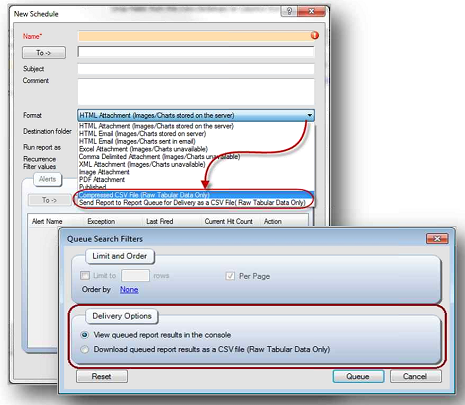
New report delivery options allow the user/developer to send scheduled and queued reports directly to a compressed CSV files. Since this reduces the processing time, it is now possible to run reports that return up to 1 million rows (before we were limited to returning 10,000 rows), which is going to avoid bounced emails due to size and decrease report fail due to too much data.

image 10

– New Contacts with Invalid Email Addresses report was added to the set of OOTB reports and lists all contacts that have one or more invalid primary or alternate email address, resulting from both hard and soft bounces. It also shows the date each address was set to invalid.

Policy Automation

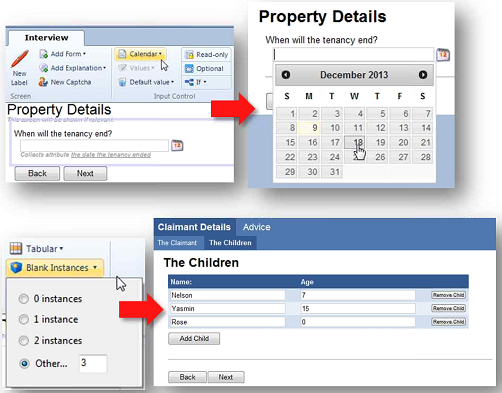
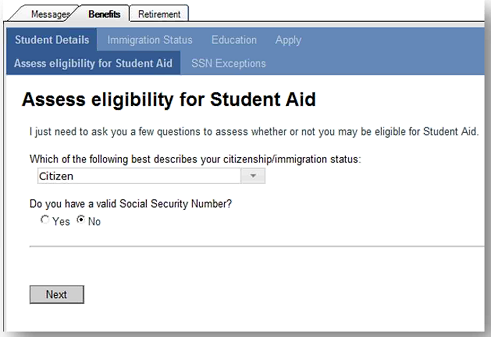
Policy Automation is already integrated in the Service Cloud providing the ability to deal with complex customer interactions through personalized, consistent, and transparent advice. It was enhanced to further streamline the interview process and now has a new calendar control (that pops up to input date) and new tabular data entry control, as well as support for more languages – Danish, Norwegian, Swedish, Portuguese, Japanese, and Italian. On top of that, agents are now able to work in multiple interviews simultaneously and the data in the interview is saved into the incident thread, either it is done via CP or Agent Desktop.

image 11

image 12

RightNow November 2013 Release

The November 2013 release of Oracle RightNow CX (or Oracle Service Cloud) provides significant new features and capabilities.

Virtual Assistant

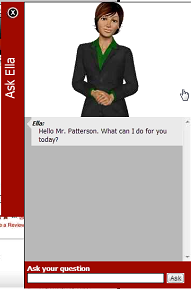
Oracle RightNow Virtual Assistant: One of the coolest new features of this release. With the virtual assistant organisations can decrease the volume of Live Chat sessions that require an actual human agent.

virtualagent

Live Chat

Virtual Assistant Escalation: Whilst servicing the customer, the Virtual Assistant checks for agent availability and seamlessly transfers the customer to a Live Chat session, providing the agent all the information collected up front.

Page Peek: Agents can now see a snapshot of the actual website page the customer was navigating when he engaged in the Live Chat session. (note: sensitive data such as account or credit cards numbers can be hidden so they are not displayed to the agent).

pagepeek

Customer Portal

Widget Migration Assistant: This is something particularly useful for developers, saving time and making them more efficient. A widget wizard guides the developers through the custom code migration process. On top of that, it provides code validation and enhancement suggestions. (note: Framework Version 3 has to be enabled).

Connect Object Explorer (COE): Another cool feature for developers. COE makes it easier for developers to inspect the objects that Connect exposes, providing an object and field explorer to view metadata information and a have a stronger understanding of Connect objects. It also has an easy-to-use ROQL query interface which allows the export of custom queries.

coe

New widgets: The November 2013 version of the CP includes several new widgets:

  • ClickjackPrevention widget
  • TopAnswers widget
  • VirtualAssistantAvatar
  • VirtualAssistantBanner
  • VirtualAssistantSimilarMatches
  • VirtualAssistantFeedback

Access to customer profile data with JavaScript: Developers are now able to access customer profile information using JavaScript (avoiding the need to gather that information in a widget controller.php file and manually pass it to JavaScript.

Interface-specific cookies: To prevent malicious reuse of the cookie across interfaces.

File attachment thumbnail display: The FileListDisplay widget now includes a display_thumbnail attribute that displays thumbnails of image file attachments on the question details page of all three page sets.

Hiding empty columns on reports: The new hide_empty_columns attribute prevents the display of output columns for custom fields or custom attributes that do not contain data.

Link to Customer Portal API documentation: The Help button on the dashboard of the Customer Portal Administration site now includes a link to the PHP API and JavaScript API documentation.

Removed widgets: The following deprecated widgets have been removed from this version of the CP:

  • MobileEmailAnswerLink
  • ContactNameDisplay

Agent Desktop

Single Sign-On Identity Provider: The new release enables the administration of SSO integrations with external applications that reside outside RightNow CX. SSO integrations allow RightNow to be used as an identity provider to store and authenticate customer credentials.

Message Templates: Enhanced features to customise and personalise admin notifications and emails, as well as contact emails.

  • Conditional content in Incident threads (insert adverts/coupons in response threads).
  • Customisable subject lines (add up to 5 merge fields on the subject line)
  • Customisable print templates
  • Case Sections
  • Merge report properties

Mobile

Agent Mobile App: It was enhanced and is now supported not only in Apple’s iPads but in iPhones, providing also the ability to:

  • Create and edit Contacts;
  • Access Survey result history;
  • Forward Incidents, Tasks, and Answers;
  • Upload Incident attachments;
  • View a customised Incidents report;
  • View knowledge base answers;
  • Customise lists and other Mobile Workspaces.

Reports

Standard Reports: Two new reports were added to help admins identify other reports that are not running as efficiently as required.

  • Report failure details (lists reports that failed to run, the reasons for that, and how often they failed)
  • Summary of Report failures (lists the types of report failures along with the number of times the failure was encountered during a specified date range)

Enhanced report analyser: The report analyser now contains additional information that help admins work on the efficiency of the reports.

Social

Ignore results control and monitoring: Admins now have the ability to control which agent profiles have the permission to ignore social media posts. On top of that, new reports are now available to help admins monitor the number of posts being ignored by agents on an hourly, daily, or monthly basis.

Twitter filters: New filters were added to help reduce clutter when performing Twitter searches. Also, it is now available the ability to filter Twitter posts by the number of followers and exclude retweets from search results.

Facebook locale search: Already available on Twitter searches in previous releases, filter by locale when performing a Facebook search on public feed is now available, to narrow down to the results to more relevant data.

Cloud

Infrastructure – Incident Thread Masking: This new functionality will enables organisations to better comply with internal governance and data privacy issues. Sensitive data (credit card numbers, etc.) can be automatically masked with the use of patterns/regular expressions matching. These masks are applied to thread data, either entered by the customer or the agent. The data is modified in the database and the UI.

security

Expanded Data Center Footprint: Three new data centres were recently opened in Kitakyushu (Japan), Sydney (Australia), and Amsterdam (The Netherlands), making the number of data centres rise to 8 – others are Canada, Santa Clara (USA), Oklahoma (USA), Chicago (USA), London (UK), Singapure.

RightNow August 2013 Released

Oracle has announced the availability of the RightNow August 2013 release, which brings many interesting and relevant improvements to the platform. The main aim is to continue the enhancement of the overall Customer Experience, and the most relevant developments are the integration with Oracle ATG Web Commerce and Oracle Policy Automation.

Contact Center Experience:

– The integration with Oracle ATG Web Commerce allows agents to offer assistance to customers that are buying online. By pro-actively or re-actively answering questions and supporting the buying process they can help customers to complete orders, thus reducing cart abandonment.

– The integration with Oracle Policy Automation (that is now part of the Oracle Service cloud) gives the ability for solving complex Incidents using the dynamic questionnaires within the Dynamic Agent Desktop while interacting directly with the Incident’s relevant and related data in the database.

– Date and date/time fields in Custom Objects now support dates from the 1st January 1902 (until now it was 1st January 1970). Also a minimum and maximum value can be set when power users are creating these fields in the object designer.

Mobile Agent app:

– Power users are now able to customise the Mobile App, namely the mobile Incident UI layout. They can add standard or custom fields for Incidents, Contacts or Organisations into certain areas of the Incident workspace (Summary, Additional Information, Contact Details).

– Another new feature for power users is the ability to reset staff members’ passwords and set Mobile Agent app permissions through the user’s Profile.

– Users are now able to perform a wider list of tasks from their mobile devices, such as send a message from an Incident to the primary contact, record and review Time Billed, or Filter open Incidents by Queue.

Feedback:

– New features that aim to increase the participation on Surveys will allow the placement of a syndicated survey link on the Customer Portal or any other pages. A new widget called SurveyLink is available in this version of the Customer Portal to address that.

SurveyLink widget

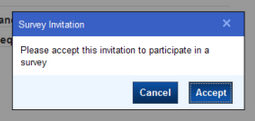
– Two other new widgets – ProactiveSurveyLink andSyndicated ProactiveSurveyLink – will give the ability to display/pop an invitation window to participate in a Survey.

ProactiveSurveyLink widget

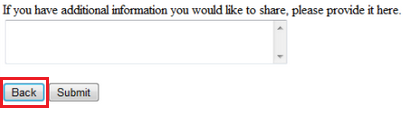
– To increase the completion and accuracy of the Surveys, a new Back button will allow customers to review or amend their previous answers before submitting the Survey.

SurveyBackButton

– Up to four automatic reminders can be configured to notify customers of forgotten or incomplete Surveys. Those notifications can include merged fields and have available the proof and preview functionalities.

Analytics:

– A new button named References will be available in the reports designer so that power users can easily see where the reports are being used. In which Workspaces, Navigation Set or Dashboard.

– A new report named Incoming Email Filter Details will help power users understand why emails are being filtered out or rejected by Techmail utility. It lists emails that were filtered out or rejected, and its details.
– Two new reports named Survey Reminder Statistics and Broadcast Response Timeline are now available to complement the new Survey reminder functionality.

– Power users can now display external images in Reports without having to store them in RightNow through the Images Explorer. This option is available configuring the column format options pointing to external locations for the image files.

AnalyticsColumnFormat

Web Experience:

– Enhancements in the Knowledge Syndication widget (KnowledgeSyndication) will allow the delivery of Answers on pages external to your Customer Portal. The aim is again to reduce cart abandonment and improve conversion rates.

– The integration with Oracle Policy Automation allows power users to build interviews that can be placed anywhere and be accessed from any channel or device.

– The DateInput and BasicDateInput widgets will now support years back to 1902 for system attribute fields. The default value of the min_year attribute remains 1970, but it can be changed.

Social Experience:

– New Community moderation planning tools will allow Community managers to better do their jobs by resource planning and tracking their moderators. Independent groups functionality will allow B2B communities and provide greater control of community interactions.

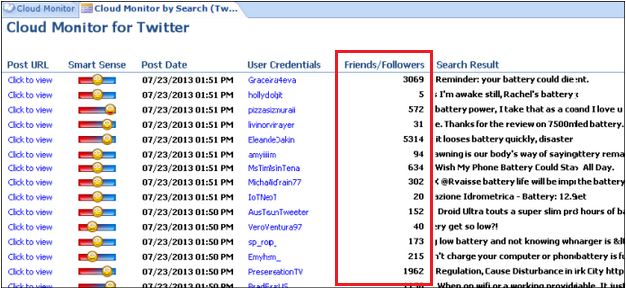
– Social Monitor improvements will allow enrichment of the customer’s social profile allowing the users to see information such as number of followers on Twitter, location and total number of posts, or number of friends on Facebook.

– That key customer profile information can also be captured and viewed in the Contact Workspace by adding the new Contact Social Profile report.

SocialMonitor

Knowledge Management:

– Improve the accuracy and relevancy of the Answers suggested by the SmartAssistant with the new AutoTuner. It leverages the machine learning, agent-specified best Answers, and implicit Answer / Incident linking information (prioritising Answers that have been appended to Incidents or have been identified as the Answer that best resolved an Incident).

Cloud Platform:

– Phase II of Custom Process Models brings improvements in the application performance as they enable existing processes to continue to run while waiting for an asynchronous response.

– Techmail utility has been enhanced and can now process email messages in parallel. The simultaneous processing of messages will increase the speed and the amount of messages processed, making the reply quicker.

RightNow May 2013 Released

Oracle have announced the May 2013 release of Oracle RightNow CX Cloud Service, which has many interesting improvements that aim to enhance the Customer Experience.

Obviously, with the rise of mobile devices and social activity, the main new features/improvements are around Mobile Service (e.g. Mobile Agent App) and Social Monitoring.

Web Experience:

  • Expand service to any mobile device with a browser – not only smartphones – including hand-held game systems, readers, and other non-traditional devices.
  • Allow customer to attach images when submitting incidents through the mobile Customer Portal.
  • Allow workspace add-ins and ribbon add-ins to be used within the Chat workspace.
  • Better mobile SEO with search optimized to bring back mobile specific content.

Social Experience:

  • Identify trends in the Social Monitor. New reports available to track engagements across social networks and enable targeted trend analysis.
  • New reports provide further information to help Community Managers and Business Analysts get a deeper understanding of community engagement and usage.
  • Streamlined Community moderation workflow to simplify the management of community content and identify users that require moderation.

Contact Center Experience:

  • Mobile Agent App with new key capabilities to improve the productivity of roaming Agents and Specialists. Ability to create, assign, and update tasks. Ability to create new incidents and manage notes on contacts and incidents.

Engage:

  • Report Management Module available to help CX administrators view information about report usage. Contains thirteen reports that display information regarding scheduled reports, reports used in workspaces and navigation sets, and reports that may require excessive processing time.

Cloud Platform:

  • Open Integration and Extensibility: expanded data model coverage and product functionality through new Public APIs. Additionally, enhancements to security for SOAP Web service based integrations.