Customer, Experience and Multi-Channel

30 years ago we had only one channel to communicate: the Phone. 20 years ago Email was introduced and slowly became another available channel. In the last decade the amount of channels soared, and now we have Chat, Web Self-Service, Co-Browse, Social Media or SMS. And who knows what the next big thing is.

The customer’s channel preference is very diverse. And channel usage rates are changing very quickly in the last few years. Phone and Email are still the primary channels, but lately we have seen that in some areas/sectors/industries, Web Self-Service or Social Media are rising to overtake the “traditional” channels.

Customer’s satisfaction with the channels also changes reasonably depending on demography or area/sector/industry. Some people are glad to find the answers themselves; others to use guided assistance; others just like to have someone to do it for them. One thing is certain: everyone wants a consistent experience.

Every customer is expecting a personalised and consistent experience, no matter the channel they use to interact. And sometimes they want (or they need) to start an interaction in one channel and complete it in another channel, expecting the journey and the experience to be smooth and seamless. Therefore channel silos are not allowed.

Some interesting stats say that a very considerable amount of customers use 3 or more channels for any shopping transaction. The majority of customers use at least 3 channels for customer service related issues. And the average multi-channel customer spends 30% to 50% more than single channel customers.

Companies need to have a platform that enables multi-channel interactions; that provides the ability to respond and engage customers at any time on their preferred channel; that allows the management of cross-channel interactions; that uses the same process for handling all interactions across all touch-points.

Having such a platform will not only increase customer satisfaction and loyalty (driving more sales and profit) but also bring advantages to the companies in terms of cost, efficiency and effectiveness.

Let’s have a look at three important topics: Channel of choice; Complexity of the query; Cost of the interaction.

Channel
Companies need to be prepared to offer their customers all types of service, which needs to be consistent across all channels and touch points/devices. Customers need to be able to get knowledge at the point of need.

mc1

Complexity
Companies need to know the type of interactions they will have. They need to be aware of the complexity of their customer’s queries or issues and what that means in terms of value, resolution and volume.
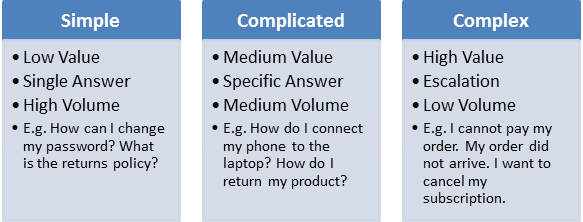
mc2

And then be able to rightly map those types of interactions to the various channels available.
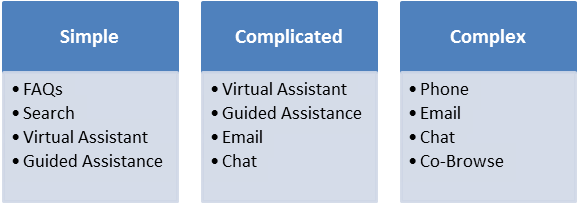
mc3

Cost
The choice of the right channel allows companies to make significant saves. E.g. by replacing Chat sessions regarding simple queries with Self-Service; by replacing Emails regarding complicated queries with Guided Assistance; by replacing Phone calls regarding complex issues with Chat.
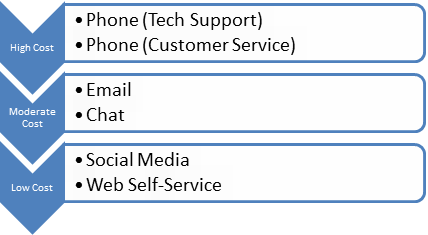
mc4

Child Objects: “Add Existing” option

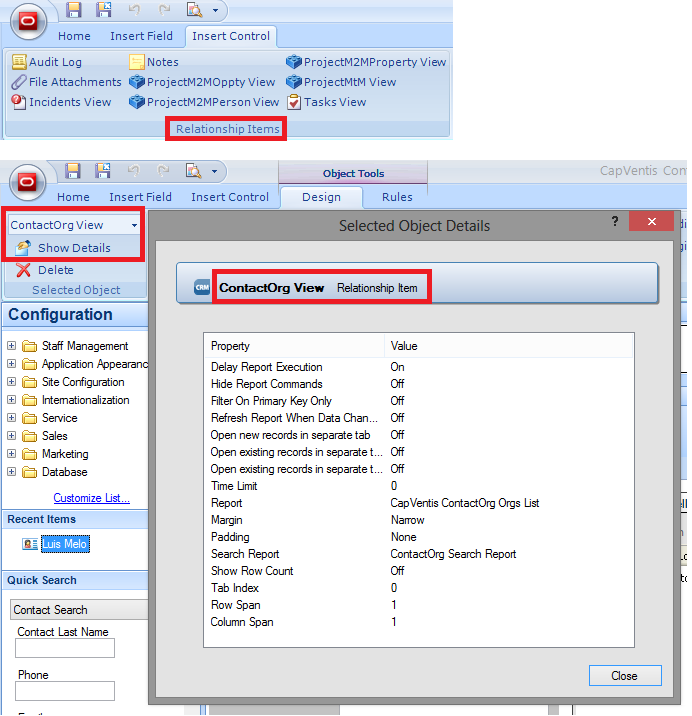
When dealing with the majority of child objects – either Standard or Custom – through the parent workspace, two options are displayed to the user for adding a new record: “Add New” and “Add Existing“.

ae1

The truth is sometimes the child object is not actually the child object. Example: If we want to create a Many-to-Many relationship we need to create an object in between the two objects that we want to link. Thus, the child object in the workspace is actual the “inter-table”.

Therefore, the “Add Existing” option no longer makes sense and it might actually confuse the user, as he might think he is adding an existing child record when in fact he is trying to add an existing “inter-table” record.

The solution to avoid this is to disable the “Add Existing” option for the user. But how can we do this? Well there are two ways.

a) Remove “Update” permissions for that object

Removing the “Update” permission from the Profiles will make the “Add Existing” option, on the top of the report, to be greyed out.

ae2

After removing the “Update” permission for the Profiles, the “Add Existing” option will be greyed out as follows.

ae3

b) Change the control that presents that object

This option is the best when the object between the two that we need to link with a Many-to-Many relationship needs to be updated.

Usually the control used on the Workspace to display a child object is the “Relationship Item”. This control will display the chosen report with the two options shown above: “Add New” and “Add Existing“.

ae4

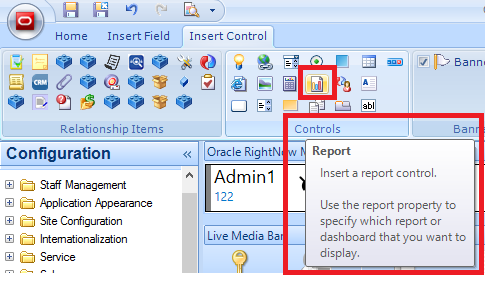
But, if instead we replace the “Relationship Item” control by a “Report” control (and choose the same report to be displayed)…

ae5

… now the report will only show the “Add New” button, and the “Add Existing” option won’t be even shown.

ae6

Call Centres: Personalisation and Resolution

When you are a Consultant in the area of CRM and CX you tend to come across many Call Centres (also known as Contact Centres, Customer Service Centres…). I had the pleasure of seeing and working with some, and I had the displeasure of calling some others.

The main aim of a Call Centre is to provide Customer Service. And Customer Service is mainly provided to existing customers. It should be easier and less costly to get business from those customers than acquire new ones. Customer Service is therefore key.

The truth is Customer Service is the main reason why existing customers leave a company. Sometimes they leave because they found something cheaper, or because they found a better product or service. But the main reason is poor Customer Service.

Sometimes poor Customer Service may not have an immediate effect – I am not giving up my newly bought iPhone because of one poor experience – but it will definitely make the customer open to other brands, as soon as he comes across them or they approach him.

Customer Service is part of the overall Customer Experience. Actually, as I see it, it is a key part. Thus, Call Centres must be able to deliver a good Customer Service. Unfortunately the reality shows that most Call Centres cannot deliver a good service and experience.

They don’t know who we are despite our phone number is generally the same. They don’t know why we are calling despite we have chosen 3 options in the IVR. They don’t treat us as a valued customer although we are customers for a number of years.

This is something that can be amended, by implementing a Customer-Centric strategy and enabling Technology. With a mix of these two, any company will be able to deliver the key ingredients for a good Customer Service and Experience: Personalisation and Resolution.

To deliver Personalisation, the Call Centre advisor needs to treat the customer as a person (rather than an account number) and know his history with the company. For that, the company needs to empower the advisor with the necessary information and a 360° view of the customer.

It is crucial that the customer data is accessible, accurate and clean in the CRM system. The CRM system must be able to identify the customer regardless of the channel, and respond through his channel of choice. The CRM system should also route customers to the right queue/advisor.

To deliver Resolution, the Call Centre advisor needs to have the wisdom required to deal with any inquiry or issue, and the ability to do it as quickly as possible. For that, the company needs to empower the advisor with the necessary knowledge at a click of a mouse.

It is therefore critical that the CRM system has a comprehensive, rich and dynamic source of information able to leverage knowledge throughout the entire ecosystem (Customer Service and Self-service) delivering relevant in-time information when and where it’s needed.

Oracle RightNow CX (also known as Oracle Service Cloud) has all the necessary capabilities that would help a company deliver a great Customer Service and an outstanding Customer Experience.

RightNow November 2013 Release

The November 2013 release of Oracle RightNow CX (or Oracle Service Cloud) provides significant new features and capabilities.

Virtual Assistant

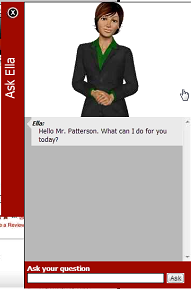
Oracle RightNow Virtual Assistant: One of the coolest new features of this release. With the virtual assistant organisations can decrease the volume of Live Chat sessions that require an actual human agent.

virtualagent

Live Chat

Virtual Assistant Escalation: Whilst servicing the customer, the Virtual Assistant checks for agent availability and seamlessly transfers the customer to a Live Chat session, providing the agent all the information collected up front.

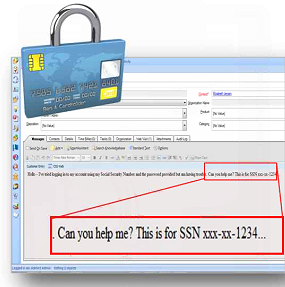
Page Peek: Agents can now see a snapshot of the actual website page the customer was navigating when he engaged in the Live Chat session. (note: sensitive data such as account or credit cards numbers can be hidden so they are not displayed to the agent).

pagepeek

Customer Portal

Widget Migration Assistant: This is something particularly useful for developers, saving time and making them more efficient. A widget wizard guides the developers through the custom code migration process. On top of that, it provides code validation and enhancement suggestions. (note: Framework Version 3 has to be enabled).

Connect Object Explorer (COE): Another cool feature for developers. COE makes it easier for developers to inspect the objects that Connect exposes, providing an object and field explorer to view metadata information and a have a stronger understanding of Connect objects. It also has an easy-to-use ROQL query interface which allows the export of custom queries.

coe

New widgets: The November 2013 version of the CP includes several new widgets:

  • ClickjackPrevention widget
  • TopAnswers widget
  • VirtualAssistantAvatar
  • VirtualAssistantBanner
  • VirtualAssistantSimilarMatches
  • VirtualAssistantFeedback

Access to customer profile data with JavaScript: Developers are now able to access customer profile information using JavaScript (avoiding the need to gather that information in a widget controller.php file and manually pass it to JavaScript.

Interface-specific cookies: To prevent malicious reuse of the cookie across interfaces.

File attachment thumbnail display: The FileListDisplay widget now includes a display_thumbnail attribute that displays thumbnails of image file attachments on the question details page of all three page sets.

Hiding empty columns on reports: The new hide_empty_columns attribute prevents the display of output columns for custom fields or custom attributes that do not contain data.

Link to Customer Portal API documentation: The Help button on the dashboard of the Customer Portal Administration site now includes a link to the PHP API and JavaScript API documentation.

Removed widgets: The following deprecated widgets have been removed from this version of the CP:

  • MobileEmailAnswerLink
  • ContactNameDisplay

Agent Desktop

Single Sign-On Identity Provider: The new release enables the administration of SSO integrations with external applications that reside outside RightNow CX. SSO integrations allow RightNow to be used as an identity provider to store and authenticate customer credentials.

Message Templates: Enhanced features to customise and personalise admin notifications and emails, as well as contact emails.

  • Conditional content in Incident threads (insert adverts/coupons in response threads).
  • Customisable subject lines (add up to 5 merge fields on the subject line)
  • Customisable print templates
  • Case Sections
  • Merge report properties

Mobile

Agent Mobile App: It was enhanced and is now supported not only in Apple’s iPads but in iPhones, providing also the ability to:

  • Create and edit Contacts;
  • Access Survey result history;
  • Forward Incidents, Tasks, and Answers;
  • Upload Incident attachments;
  • View a customised Incidents report;
  • View knowledge base answers;
  • Customise lists and other Mobile Workspaces.

Reports

Standard Reports: Two new reports were added to help admins identify other reports that are not running as efficiently as required.

  • Report failure details (lists reports that failed to run, the reasons for that, and how often they failed)
  • Summary of Report failures (lists the types of report failures along with the number of times the failure was encountered during a specified date range)

Enhanced report analyser: The report analyser now contains additional information that help admins work on the efficiency of the reports.

Social

Ignore results control and monitoring: Admins now have the ability to control which agent profiles have the permission to ignore social media posts. On top of that, new reports are now available to help admins monitor the number of posts being ignored by agents on an hourly, daily, or monthly basis.

Twitter filters: New filters were added to help reduce clutter when performing Twitter searches. Also, it is now available the ability to filter Twitter posts by the number of followers and exclude retweets from search results.

Facebook locale search: Already available on Twitter searches in previous releases, filter by locale when performing a Facebook search on public feed is now available, to narrow down to the results to more relevant data.

Cloud

Infrastructure – Incident Thread Masking: This new functionality will enables organisations to better comply with internal governance and data privacy issues. Sensitive data (credit card numbers, etc.) can be automatically masked with the use of patterns/regular expressions matching. These masks are applied to thread data, either entered by the customer or the agent. The data is modified in the database and the UI.

security

Expanded Data Center Footprint: Three new data centres were recently opened in Kitakyushu (Japan), Sydney (Australia), and Amsterdam (The Netherlands), making the number of data centres rise to 8 – others are Canada, Santa Clara (USA), Oklahoma (USA), Chicago (USA), London (UK), Singapure.

How RightNow could have avoided another bad CX

A few days ago I shared in this blog a real experience with a telecom provider. It was another very bad customer experience that could easily be avoided or attenuated if the company (in this case, O2) was using the best technology, the right way.

  • RightNow Agent Desktop would have avoided the agent from treating me in a depersonalised way (!!) as if he didn’t know me as a customer or my history with the company. The Agent Desktop provides a 360° view of the customer and an end-to-end management of the customer journey through unified records, interfaces, and knowledge.
  • RightNow Chat would have avoided the agent from asking me again (!!) the type of tariff I had, once I had already filled the field “Type of Tariff” when requesting the chat. RightNow Chat is completely integrated in the Agent Desktop and immediately passes the customer’s information to the chat agent before the chat is initiated.
  • Also, RightNow Chat provides conferencing, transfer or supervisor monitoring capabilities, which could have been used by a) the agent, to call for help from a senior colleague/manager, b) the manager/supervisor, that whilst monitoring the chats found strange that a chat session was taking more than 1 hour (could even be notified of that fact).
  • RightNow SmartAssistant would have avoided the agent from sending me a huge amount of useless (!!) information after I explained my issue in detail. The RightNow SmartAssistant evaluates the written text in the transcript and comes up with a few answers (i.e. articles in the knowledge base) that are related and will most likely resolve the customer’s issue.
  • RightNow Knowledge Base would have avoided the agent from telling me I was wrong whilst showing ignorance (!!) of its own services. The RightNow Knowledge Base presents the same relevant and consistent knowledge across all channels of interaction, either for agents or customers, infusing knowledge from the entire ecosystem.
  • RightNow Standard Text would have avoided the agent from poor and pathetic (!!) writing. RightNow Standard Text can be used when responding to customer in chat sessions, in order to save time, eliminate errors, and give consistent answers. Agents can use hot keys as shortcut for inserting standard text, which can include merge fields/variables (e.g. the contact’s first name).

I’m pretty sure that, even without a very good Customer Experience strategy in place, the use of the best technology – Oracle RightNow CX – would make this experience a lot better.

O2: Another bad Customer Experience

Requested a chat session from O2 to resolve a simple issue. O2 uses LivePerson to chat. Before starting the session it asks the Name, Number and Type of tariff. I filled all the fields “Luis Melo“, “07445……” and chose “Pay Monthly“. The chat agent greeted me and asked what was my issue, which I exposed.

The agent asked me if it was for my PAYG number?! No, it’s not! a) I don’t have (never had) a PAYG number with O2, b) You have my name and number, so if you check my account you’ll not find any PAYG number, c) I just chose the option “Pay Monthly” before the chat started… “Pay Monthly” I said.

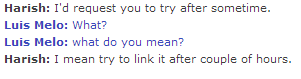
The first response was the worse response an agent can give to a customer these days: “Try again later“. Systems should not even allow these words to be written. This is the worse you can tell a customer. a) You’re not solving his problem, b) Your not giving a logical or rational answer.

O2_no_funny_part1

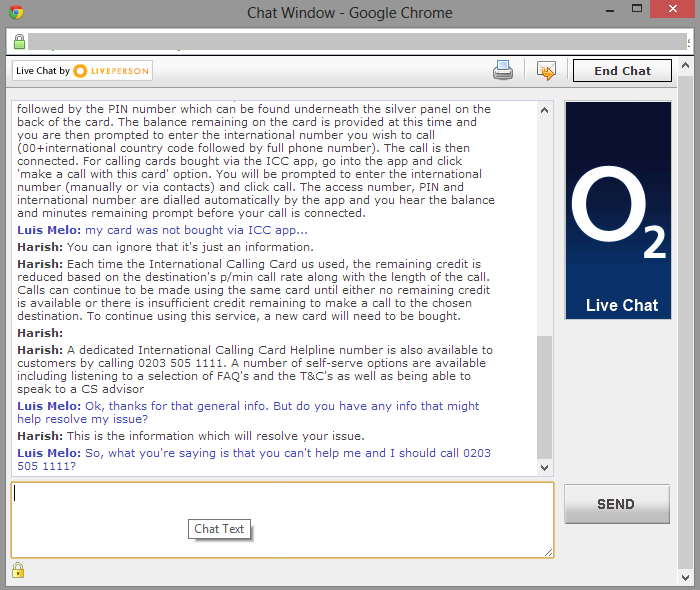
I gave a very detailed explanation of my issue but the agent kept sending me huge amount of generic information that was not related nor helping. And despite I told him that it was not helping, he kept insisting that it should solve my issue. Until he said that what I was trying to do was impossible.

O2_no_funny_part

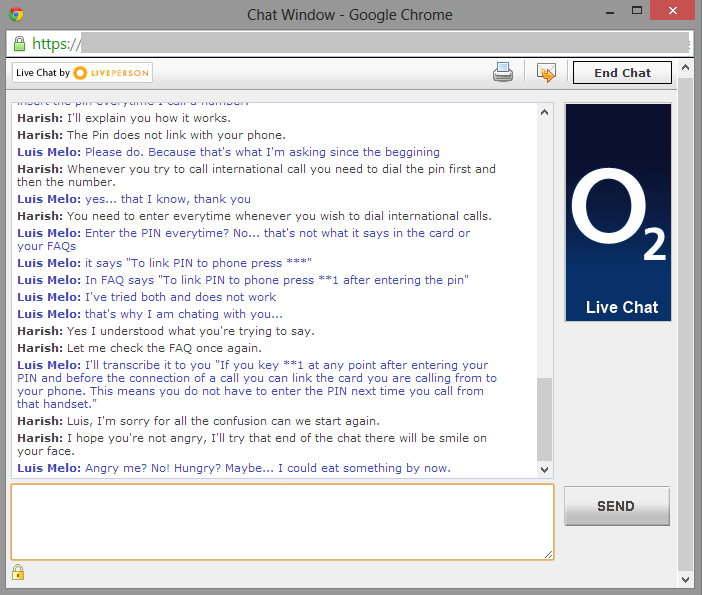
At this point I showed him an FAQ on O2 website that was saying the opposite. But it was not working, and that was my issue. So he asked me to let him check the FAQs and came back apologising. A funny moment after that, as he said he didn’t want me angry and would end up putting a smile on my face.

O2_funny part

He actually did. Not because he sorted my issue but because he was pathetic. After telling me step-by-step what to do (replicating what I’ve done already many times) and failed, he told me to… “Try again later“!!… and with a puppy’s expression said he was sure that that should have been sorted.

O2_funny_part2

The end of the story is: He put me on hold for a long time, asked me many times for patience, and didn’t solve my issue. After some time I quit. He was glad and suggested me to go to a store.

O2_end


P.S. – Soon I will be posting how RightNow CX could avoid most of this hassle.

Offer Advisor: Set up and use

Offer Advisor provides offers that agents can present to the customer while dealing with a Service Request.

In a Sales perspective, organisations can use Offer Advisor to enable their agents in the call centre to cross-sell (by offering products compatible with those the customer has already purchased) or up-sell (by offering a premium version of a product the customer currently owns).

In a Service perspective, organisations can use Offer Advisor to enable their agents in the call centre to offer new SLAs and renewals, remind customers about warranties, add customers to a newsletter mailing list or provide information about product recalls.

If a customer shows interest in one of the offers presented by the agent, Offer Advisor automatically creates an Opportunity against his contact.

Offer Advisor delivers two types of offers:

  • Promotion: A program defined by the organisation that specifies the effective dates, the product (if applicable), the promotion’s priority, and the target eligible for the promotion.
  • Suggestion: An automated product recommendation that predicts customer interest based on purchase history (purchase history has to be integrated into RightNow).

Setting up Offer Advisor

Configuration settings are used to enable Offer Advisor and configure its functionality. Then agents are able to use it while dealing with customers (make sure that the Offer Advisor button appears on the incidents workspace ribbon).

  1. Integrating purchase history data: If you want Offer Advisor to use purchase history, you must integrate that data.
  2. Creating targets: Every promotion needs an intended audience, which is its target. You can create unique targets for specific promotions as well as general targets you can use for multiple promotions.
  3. Adding promotions: Once you have enabled Offer Advisor, integrated purchase history day, and created targets, you can create promotions that include dates, products, information for the agent, and targets.

Creating Targets

Every promotion has to be at least associated to one target (i.e. customers to whom your organisations want to present the promotion). Targets can be specifically created for one promotion or they can be generic for multiple promotions.

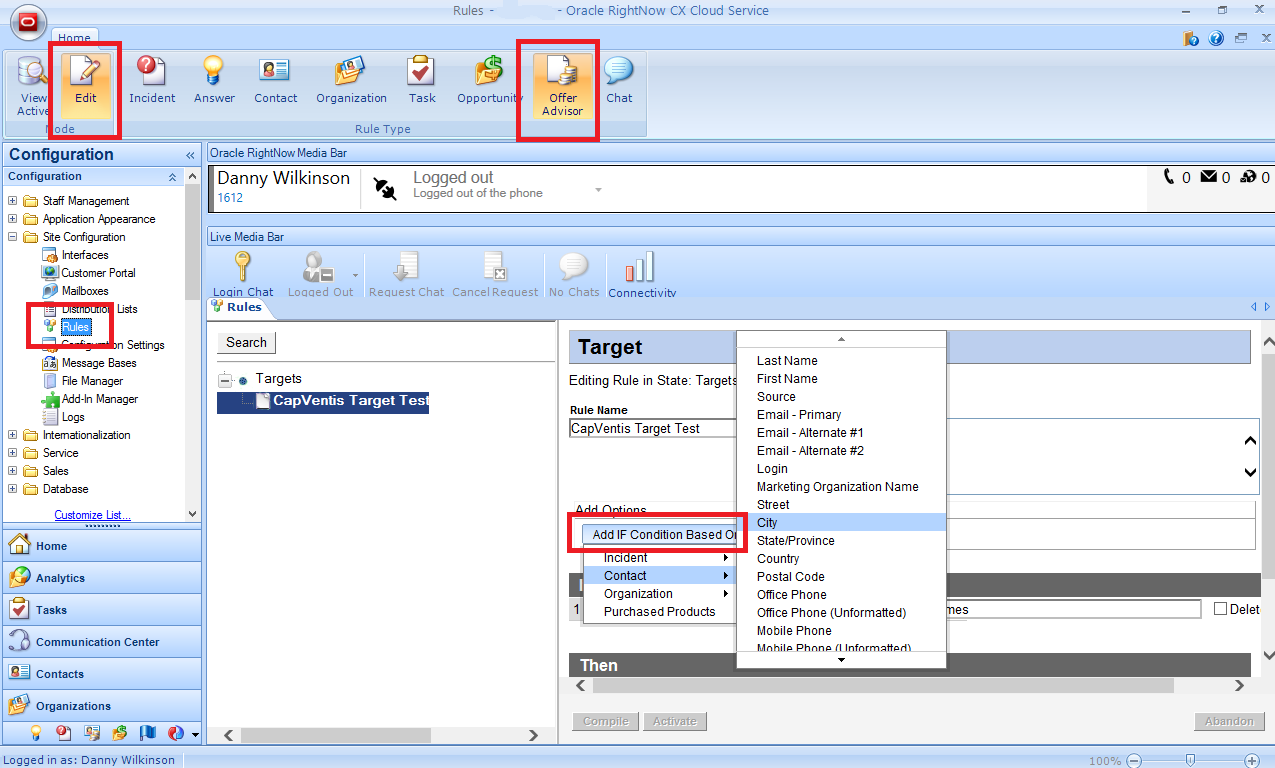
In the Business Rule of type Offer Advisor only one state (named “Targets”) is allowed. You cannot add states or functions in target rules. Also, regardless of the conditions you select (the “If”), the default action (the “Then”) is always “Contact will match this target”. It is not possible to add another action (the “Else”).

To define the conditions of a target fields from Incident, Contact, and Organization tables can be used. It is also possible to select a unique Purchased Products condition for target rules. This condition is a combination of three conditions – Product, Price, and Date Purchased – all of which must be met.

1. Click the Configuration button on the navigation pane.
2. Double-click Rules under Site Configuration.
3. Click the Offer Advisor button on the ribbon.
4. Click the Edit button on the ribbon.
5. Right-click Targets in the tree and select New Rule.
6. Type the name of the target rule in the Name field.
7. To add notes to the rule, type them in the Notes field.
8. Click the Add IF Condition Based On button
9. Select the fields/operators/values to build the target
10. Click the Save button to save the target rule.
12. Click the Activate button to compile and activate the target rule base.

offer_adv_1

Creating promotions

Promotions include the product or message you want agents to present to customers who belong to a specific target group. Promotions also define the active dates, the promotion’s priority, URLs to open when customers express interest in or accept a promotion, and scripts and tips for agents.

Because every promotion requires at least one target, you must define the promotion’s target before you can complete the promotion. If your promotion applies to a sales product, you must also be sure the product is in the product catalog.

1. Click the Configuration button on the navigation pane.
2. Double-click Promotions under Sales.
3. To add a promotion, click the New button on the ribbon.
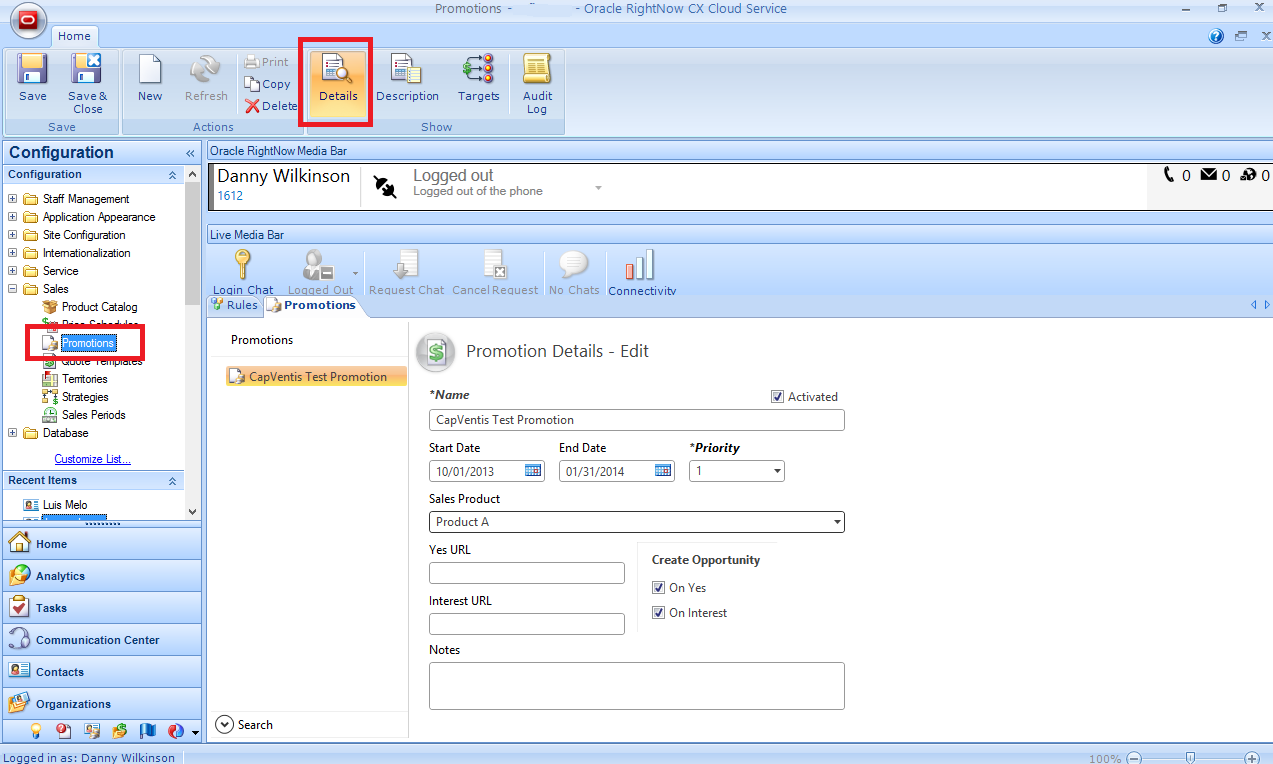
4. Type the name of the promotion in the Name field.
5. Enter promotions details.
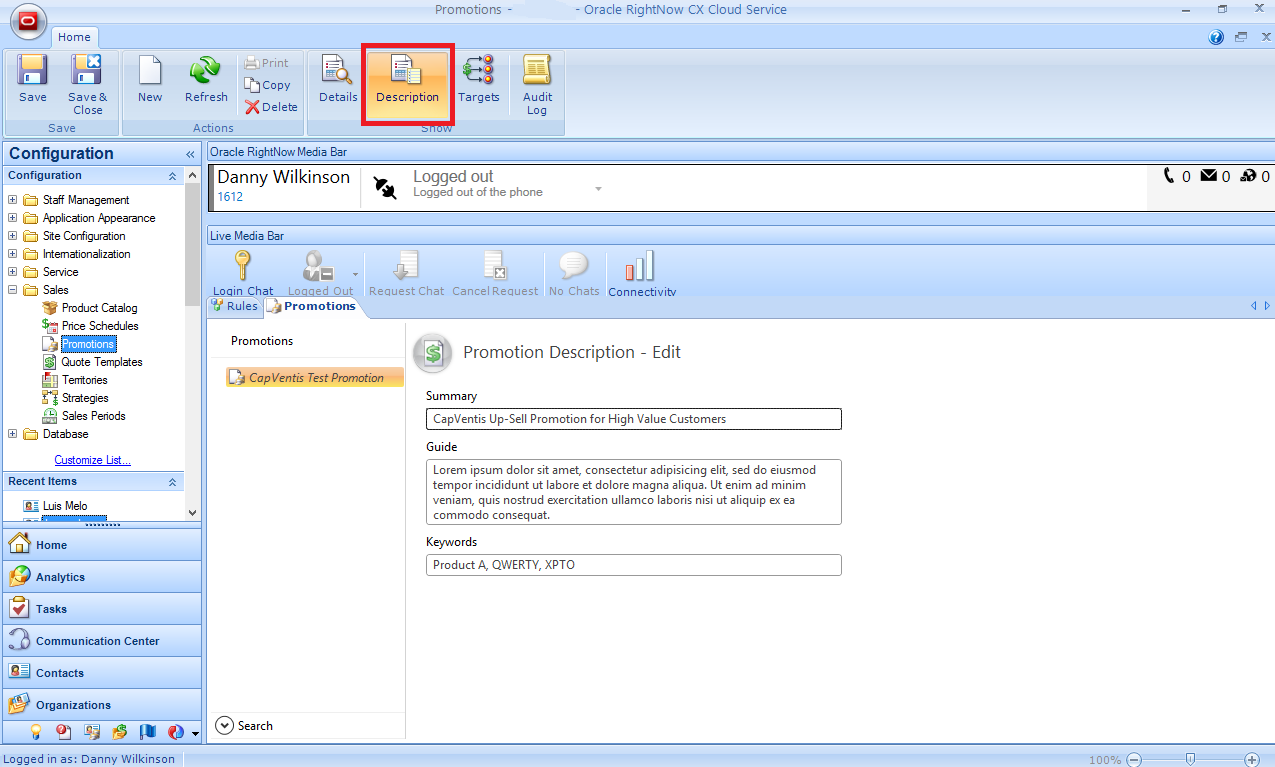
6. Click the Description button on the ribbon.
7. Enter promotion information: summary, guide, and keywords.
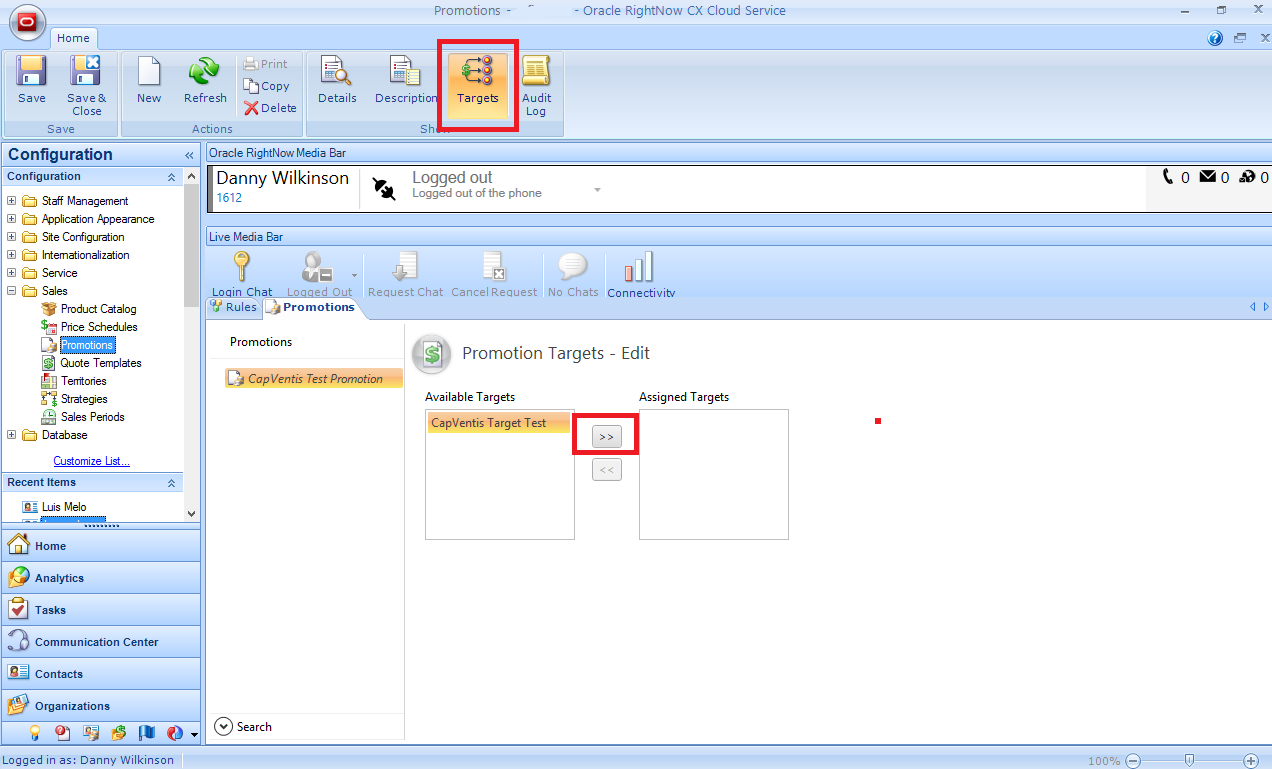
8. Click the Targets button on the ribbon.
9. Specify the targets.
10. Click the Save and Close button on the ribbon to save the promotion.

offer_adv_2

offer_adv_3

offer_adv_4

Using Offer Advisor

When an agent is dealing with a customer’s issue (on the Incident workspace) Offer Advisor uses the customer’s information to search for promotions that he might be eligible for and product suggestions that he might be interested in. If Offer Advisor finds any promotions or product suggestions the Offer Advisor button is enabled on the ribbon.

offer_adv_5

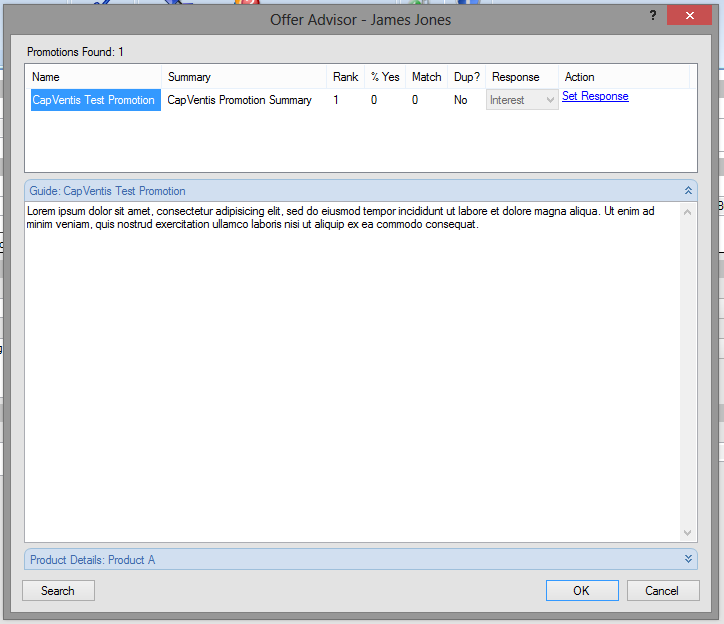
Clicking on the Offer Advisor button, The Offer Advisor window displays and contains promotions and suggestions that the customer is eligible for, as well as the Guide and Product details set on the promotion.

offer_adv_6

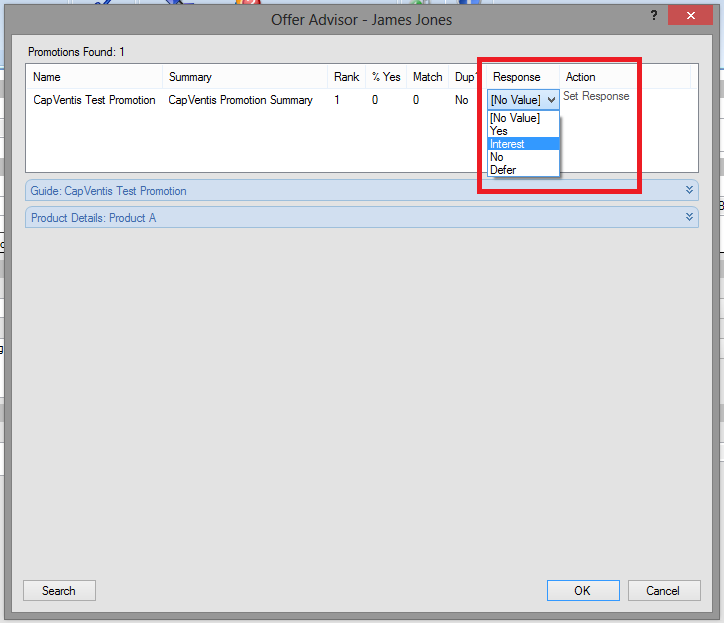
After offering to the customer, his response can be logged by clicking the Set Response link on the Action column. This will activate the picklist on the Response column and allow the agent to register the customer’s response.

offer_adv_7

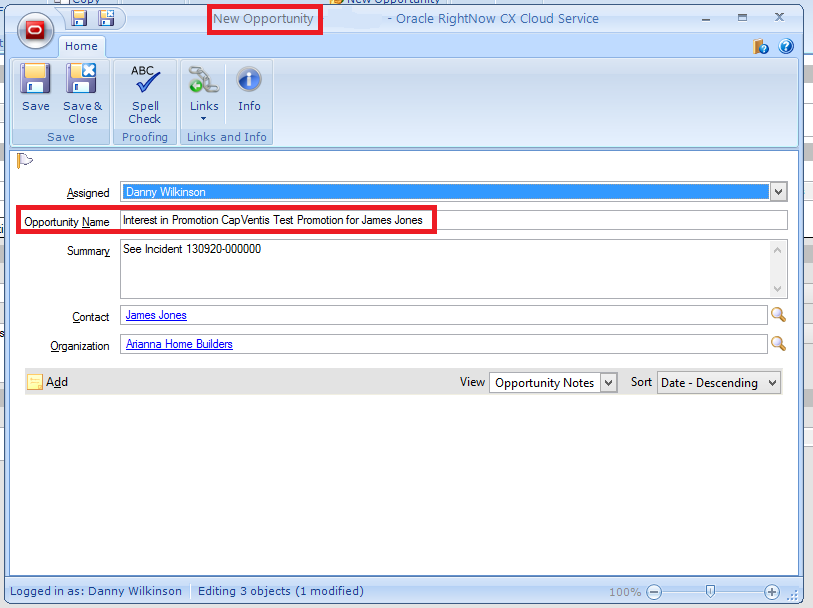
In case the response is positive, an Opportunity is automatically created and opened for the agent.

offer_adv_8

A smart investment in… RightNow CX

Recently I had one of the worse customer experiences ever with Vodafone UK (see previous post). As I said at the end, Vodafone UK has a gigantic task to try to deliver a good Customer Experience in order to acquire/retain customers.

This is something that can only be achieved with a big Cultural change, a huge Strategic shift, and a smart investment in Technology. Using a platform like Oracle RightNow CX Cloud Service, Vodafone UK would be able to easily improve the Customer Experience and avoid some of the hassles they gave me…

  • RightNow Cloud Service: Being a cloud service, changes to the system can be made on the fly and without any down time. It is a robust solution with secure global access and a fully redundant architecture. Avoiding the the in-store system being down.
  • RightNow Contact Centre: An easy-to-use and user-friendly application with very intuitive and familiar look & feel, giving instant insight of the Customer’s history. Avoiding the in-store user or the contact centre agent to take a huge amount of time navigating the system to find information.
  • RightNow Agent Desktop: Provides a 360° view of the customer and an end-to-end management of the customer journey through unified records, interfaces, and knowledge. Avoiding the customer to be forced to tell his story over and over again, countless times.
  • RightNow Chat: Completely integrated in the Agent Desktop immediately passes the customer information to the chat agent before the chat is initiated. It is multi-device (PC, SmartPhone, Tablet) and provides conferencing, transfer, supervisor monitoring or standard response templates. Avoiding the chat agent having to ask the customer’s for his name/number again, sinking into lengthy conversations and taking a long time to transfer/conference.
  • RightNow CTI Integration: Provides an embedded call control within the Agent Desktop (CTI Media Bar), passes IVR and Customer data to the agent before the call is answered, and triggers rules, scripts or guided assistance. Avoiding the agent to ask the customer who he is, what’s his number and why is he calling.
  • RightNow Knowledge Base: A self-learning knowledge base that learns from every interaction and enables web self-service by leveraging relevant and in-time information in the Web or Mobile Customer Portal, offering the customer the possibility to self-serve and quickly resolve his query. Avoiding customers from choosing other (more expensive and time consuming) channels.
  • RightNow Incident Management: The Incident Messages Thread allows contact centre agents or users to log interactions from different channels (web, email, chat, phone, social media), but regarding the same issue, into the same Service record, creating a complete track of the customer’s issue history. Avoiding the agent having to search for previous history or asking the customer to repeat himself.

Vodafone UK: The worse Customer Experience

My mobile tariff with 3 was great for personal use, but I needed a different one for business purposes (more UK minutes, international calls, etc.). I did a research and decided to go for a monthly contract with Vodafone UK.

Interaction #1 (in-store)
Popped into a store and asked to buy a SIM card with a monthly contract. Apparently the system (Siebel CRM) was down so they were not able to give me what I wanted. Sold me a SIM card with a PAYG tariff, and asked me to return the next day.

Interaction #2 (in-store)
I returned to the same shop the next day. The system was already up and running but apparently didn’t allow the change from PAYG to monthly contract. The staff member tried to do it over the phone. 30 min later, asked me to come back the next day.

Interaction #3 (in-store)
The third time I went to the shop, the system was able to transfer my PAYG to a monthly contract, but there was another problem: Apparently my address was blacklisted (the only issue here is that addresses are no longer blacklisted, people are).

I sticked with the PAYG for 2 weeks whilst I tried to resolve this issue. The truth was the signal was awful. It was coming and going whilst I was sitting in the same place. I was not able to do/receive calls, the ones I received were dropped many times and I was not able to send or receive emails.

Obviously I was not satisfied. Therefore I went to an O2 store to double check their tariffs. O2 had a monthly contract that was similar to Vodafone’s but cheaper. I went for it. Bought a SIM card and signed a contract, with no issues. I now needed a PAC code to transfer my number.

Interaction #4 (Web)
Went to Vodafone UK website trying to find how could I get a PAC code. There were articles in the Knowledge Base explaining how to get PAC codes from other providers, but nothing about how to get them from Vodafone UK. As I could not find an answer to my question, requested a chat session.

Interaction #5 (chat)
The chat was provided by LivePerson. It requested my name and number prior to the chat. When the chat session started the agent asked my name and number again. I could not resolve my issue as the agent could not find my number in the system and the help line (phone) was already closed.

Interaction #6 (phone)
The next day, at 10am (opening hour), I called the help line to request the PAC code. The call cost me £0.25. Whilst I was explaining to the agent what I needed – despite he should’ve know from my latest unresolved interaction – the call was dropped due to lack of signal.

Interaction #7 (chat)
At 10h30 I went to Vodafone UK website and requested a chat session. Nancy – the agent – picked up and asked me my name and number, as well as my reason for calling. Again?! Ok, I repeated why I was calling. Nancy said she could not resolve my issue and had to transfer me to another team.

Interaction #8 (chat)
20 min (!!) later another chat agent greeted me. It was Deborah that asked me “Can you bear with me for a few moments while I read through your previous chat and have a look at your account please?”. After a few minutes she asked me if I had a PAYG – Seriously?! Didn’t you just looked into my account?! – and said that the previous agent had transferred the chat session to the wrong department, so she was going to transfer me again.

Interaction #9 (chat)
A couple of minutes later another agent, Avinash, came up asking me “How may I help you today?” and “could you please give me your number?” Again?! I repeated everything one more time. He was not able to locate my account in the system and asked me “Do you have a white SIM?”. Yes, I do. “That’s why I can’t see your account, it must be on the new platform and I do not have access”. Avinash apologised on behalf of the previous agents and transferred me again saying “This time you are in safe hands” he said “your query will be resolved and they will have a full record of this chat to pick up where we left so that you don’t have to repeat yourself”.

Interaction #10 (chat)
Vijay was the name of the 4th agent of the day, who asked me “Hello, how may I help you today?”. Again?! Really?! But your colleague just said you would have a full record to pick up where we left so that I wouldn’t have to repeat myself again!! I repeated everything all over again. It was 11h40 – 1 hour and 10 minutes (!!) after the first chat session started – when Vijay gave me the PAC code I needed.

This was the worse Customer Experience I’ve ever had with a mobile communications provider. And believe me I had many in Portugal, France, Spain or UK, with many other providers. The hassle to get a PAC code, for example, is unbelievable and unacceptable.

Vodafone UK customer-facing Sales teams seem to have an out-of-date and inefficient system (Siebel CRM) in-store. And the Customer Service teams seem to have disjointed departments and siloed systems. Also, Vodafone UK clearly has disrupted channels.

Judging by this experience, Vodafone UK teams have a gigantic task in front of them to try to create a great Customer Experience in order to acquire/retain customers. It is something that can only be done with a big cultural change, a huge strategic shift and a smart investment in technology.

P.S. – After this I received an SMS request for a Survey. Obviously the ratings I gave were low. Last question asked “Can you tell us the reasons for your ratings?“. I just replied with the link to this post. Hope they come and read it.

CX Seminar at the Aviva Stadium, Dublin

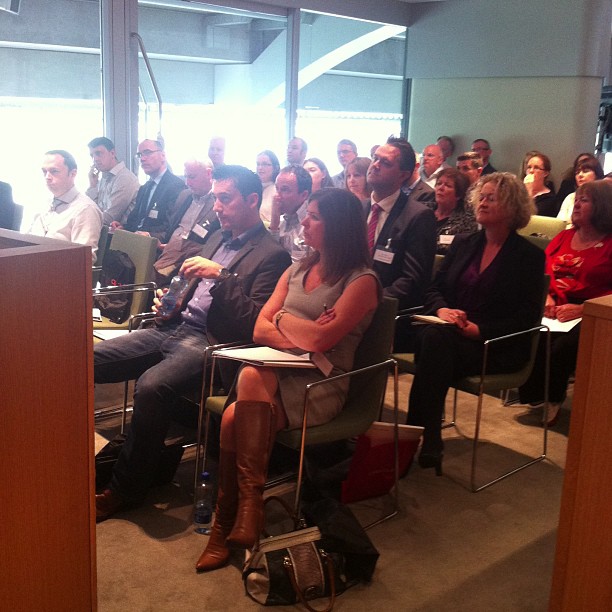
Almost 50 people attended the CX Seminar that CapricornVentis and Oracle delivered yesterday at the Aviva Stadium in Dublin, Ireland. Following the seminar the attendees enjoyed a gourmet lunch and an amusing stadium tour.

1236219_10151661443181914_1088305990_n

The main focus of the seminar was on the importance and value of CX in today’s markets and organisations, and also how technology could enable it. Then two client success stories were presented by Paddy Power and Abtran.

David Lopes (Oracle CX Strategist) opened with “The Role, Importance and Value of CX“. A great presentation that aroused the attendees, allowed them to perceive what is CX, and facilitated the connection with the technology.

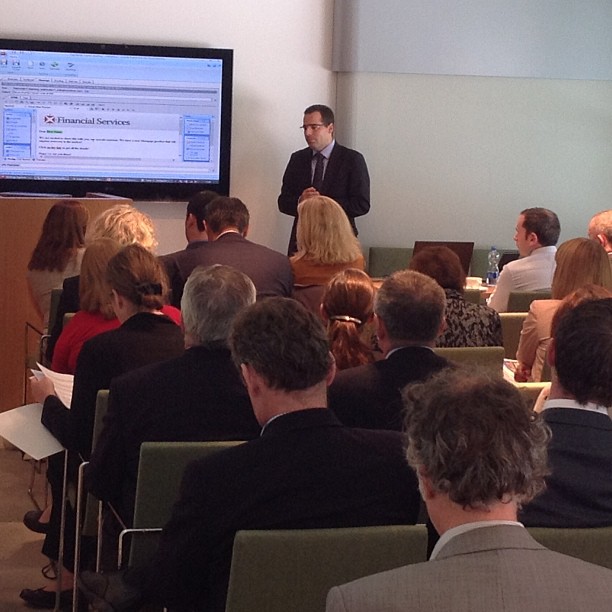
Then it was my turn to present RightNow CX and show how technology can enable CX. Based on a smooth Customer Journey (the story of James, customer of FS Bank) I was able to touch some of the key functionalities around Social, Service, Sales, Outreach, Feedback and Reporting.

1376417_10151661666076914_2054947366_n

From the feedback I got – on the individual and joint Q&A sessions, and over the coffee and lunch breaks – I sensed that people liked the technology. But more important than that, they perceived how RightNow CX can replace many systems and bring them value.

The truth is that most of the companies (if not all of them) still have silos. They use different systems to sell, to log complaints, to market their products, to deal with social media, to analyse voice-of-the-customer. And then they build warehouses for reporting and analytics purposes.

RightNow CX allows them not only to have an all-in-one, industry leading solution, but also much more than that, as it is a very powerful application, full of cool features and functionalities. That can quickly bring added value, by improving the customer and user experience.